RedNote, also called Xiaohongshu, is a Chinese social media app where people share posts, discover trends, and connect with others. Lately, it has been getting a lot of attention in the United States as people look for new apps to try.
A lot of Americans have joined RedNote recently, partly because of talks about TikTok being banned. With so many new users, the app has been seeing a huge increase in sign ups.
Because of this, some people are having trouble when they try to create an account. One common problem is that the verification code does not come through, which makes signing up frustrating.
When our team first tested RedNote, we also ran into the same problem of the verification code not arriving. After trying different fixes, we figured out what actually works and what does not. That is why we put this guide together, to help you understand why you are not getting a verification code from RedNote and how you can complete your signup.

9 Ways to Fix RedNote Not Sending Verification Code
Server Overload
As we mentioned earlier, RedNote has been getting a lot of attention lately, and many new users are downloading the app to try it out. This sudden surge in traffic can sometimes overload the servers. When the servers are busy, it can take longer for the verification code to arrive, or it might get delayed.
Sometimes this also depends on the time of day. During peak hours, when a lot of people are using Xiaohongshu at once, the load is heavier and the code may take much longer to show up. So, it is better to try signing up when the servers are less busy. Early in the morning or late at night (China time) usually gives you a better chance of receiving the code without much delay.
If this happens, simply wait a little before trying again. Give it a few minutes and check your messages once more. Sometimes the code shows up after a short delay when the servers settle down.
Switch Internet Connection
At times, the verification code does not show up because of the network you are on. If you are using WiFi, try turning it off for a while and connecting through mobile data instead. Many users have noticed that international messages often come through faster this way. Once you are done signing up, you can always switch back to WiFi for your normal use.
Check for Updates
RedNote keeps pushing updates that fix small bugs and improve how the app works. Check on the App Store or Google Play to see if there is an update option. If you find one, update the app, then try logging in to get the code again.
Check for Regional Restrictions
RedNote is banned in some countries because of government rules and concerns about security. If you are trying to sign up from one of these countries, that could be the reason why the verification code is not reaching you. For example, India and Taiwan have already blocked the app, so people there will not be able to create new accounts.
Try Airplane Mode
Another option you can try is enabling Airplane Mode for a moment and then turning it off again. While Airplane Mode is on, switch on data/WiFi and request the verification code. After that, turn off Airplane Mode completely.
Enable SMS Permission
Another reason the code might not arrive is that the app does not have permission to read or receive SMS. If this permission is turned off by mistake or on purpose, the code will never come through. Many times when we install a new app, it asks for several permissions, and we just keep tapping deny without even reading. In that case, the SMS permission gets blocked, and that could be the reason why you are not receiving the verification code. But in iOS, this is not the case since iPhones do not ask for SMS permission.
On Android, you can check this by going to your phone’s Settings > Apps > RedNote > Permissions, and making sure SMS, contacts, and calls are allowed.
If you are an iPhone user, your iMessage settings can sometimes block or delay the code. To fix this, open the Settings app, go to Messages, turn off iMessage, then turn it back on and try requesting the verification code again.
Check Country Code and Number
One of the most common mistakes during sign up is typing the number without checking the country code. Many apps, including RedNote, automatically set a default country, and if you do not notice it, you might be trying to log in with the wrong code. Always make sure the country selected is the one you live in and that your phone number is entered correctly.
Also, check that your mobile number has an active plan with enough balance or validity to receive SMS. If your plan is inactive, the verification code will never arrive.
Restart Device
While it is not an unknown solution for any issue on a device, it can be useful in many situations, so worth trying.
Contact RedNote Support
If nothing works, the last step is to reach out to RedNote support through the help center. On the sign-in page, tap “Help” at the top.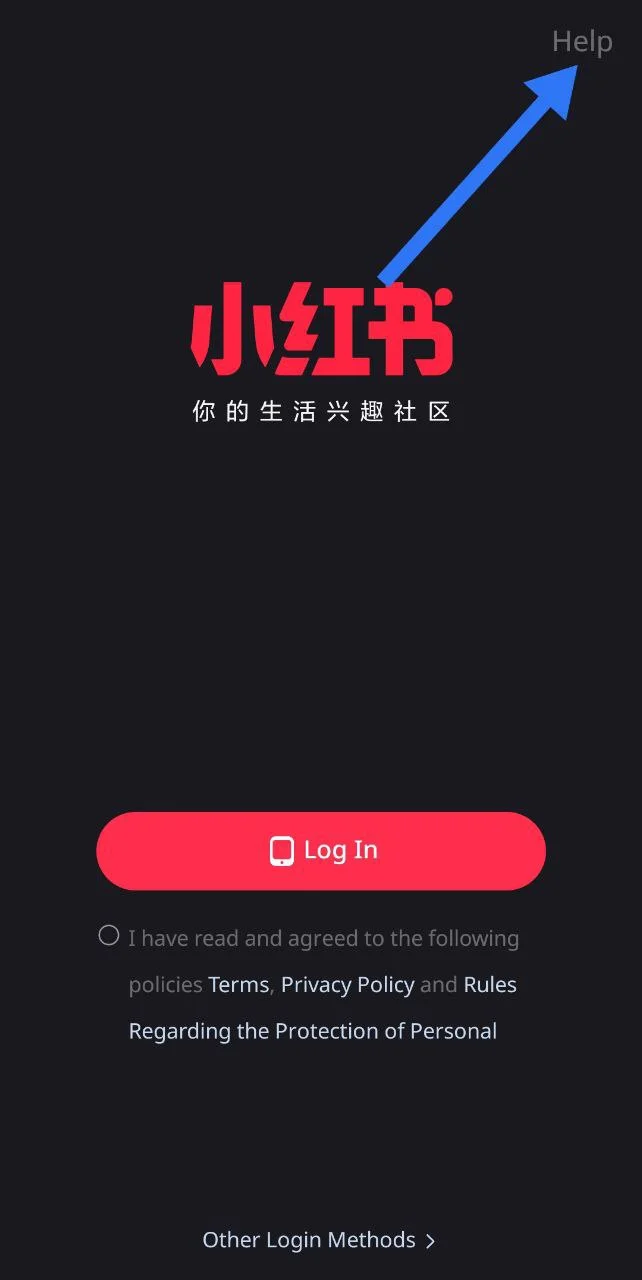
Now, select the option that says “Cannot receive the verification code,” and submit your request along with the phone number you are trying to log in with. 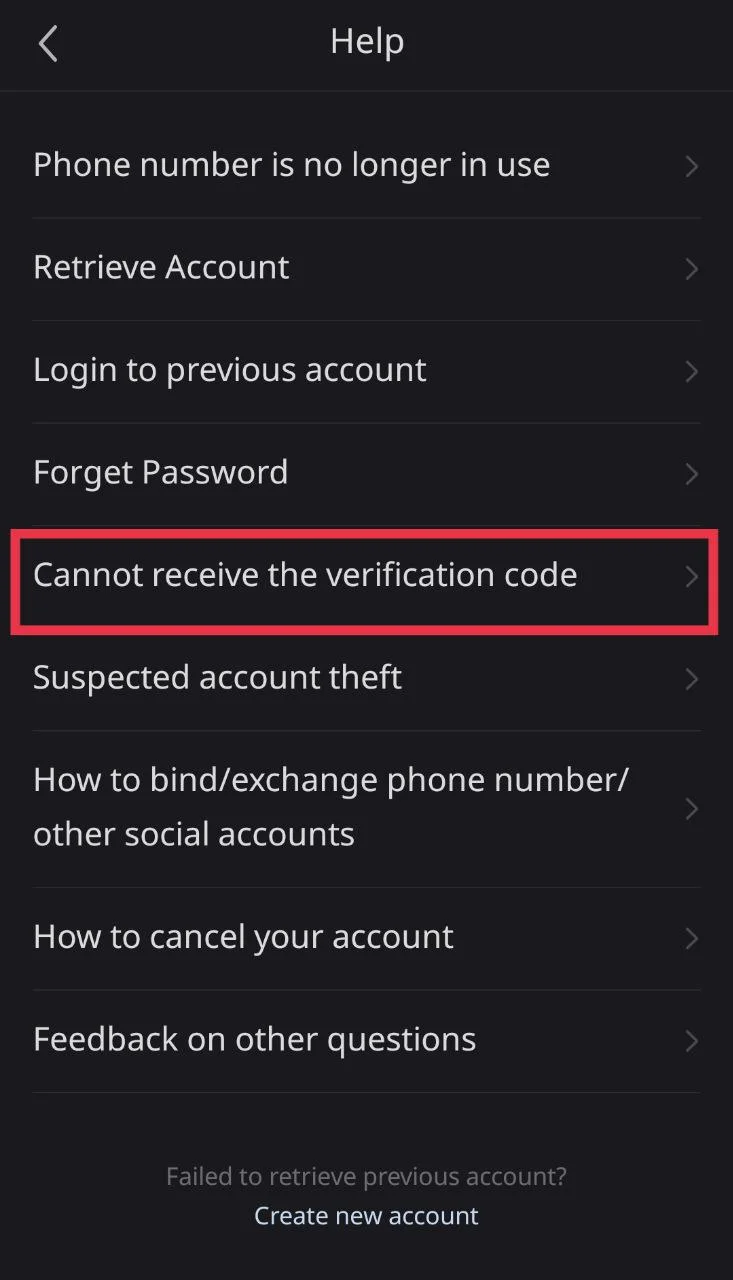
The good thing is you can contact their support even without logging in, which makes it easier to ask for help. After that, just wait for the support team to respond.
We hope these solutions help you fix the RedNote not sending verification code issue and also give you an idea of why it happens. If you found this useful, feel free to share it, and let us know if you discovered any other method that worked for you.