eTechShout
  • TECH
  • HOW TO
    • ANDROID
    • iOS
    • WINDOWS
  • TOP LIST
  • ALTERNATIVES
  • REVIEWS
  • COMPARISON
No Result
View All Result
  • TECH
  • HOW TO
    • ANDROID
    • iOS
    • WINDOWS
  • TOP LIST
  • ALTERNATIVES
  • REVIEWS
  • COMPARISON
No Result
View All Result
eTechShout
Home HOW TO

How to Fix Use the Other Installation Disc that Says 64-bit Error

by eTechShout Editor
January 5, 2021

If you are a newbie to install or Upgrade Windows on your Laptop/Computer you may encounter this problem. The problem is that after burning the Windows ISO File and when you tried to run “setup.exe” then you may get an error of “Use the other installation disc that says 64-bit When you insert it Windows Setup will restart automatically.”

I have faced this problem on my laptop and found the solution for it. So here is an easy step to solving that error without using any tools.

How to Fix “Use the other installation disc that says 64-bit” error?

  1.  First of all burn the Windows ISO file using Any tools like Rufus or any other tools
  2.  After burning click Start, then go to “My Computer” or “This PC”.
  3.  Now look for the DVD / USB drive that has the Windows installation on it. For example, if you’ve Windows installation file on D Drive then click on Local Disk(D:) and Find Disk image file of Windows)
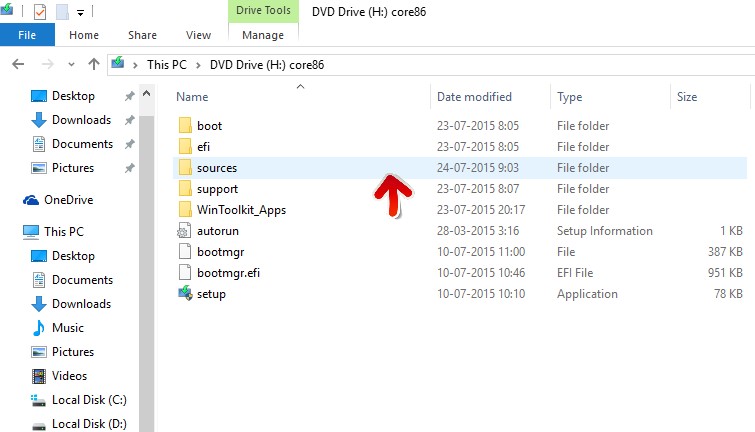
  4.  Then Open that file and you can see the “Sources” folder in it
  5.  Click and open it
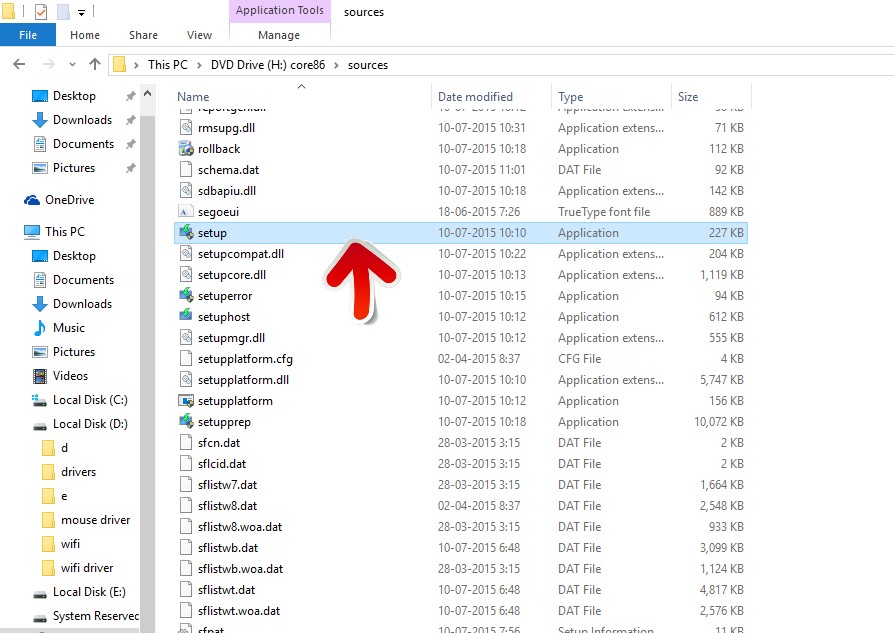
  6.  Now search for the setup.exe file.
  7.  Open setup.exe file by double-clicking on it
  8.  Now you can see the Windows installation beginning!
  9.  Now follow a simple installation guide.
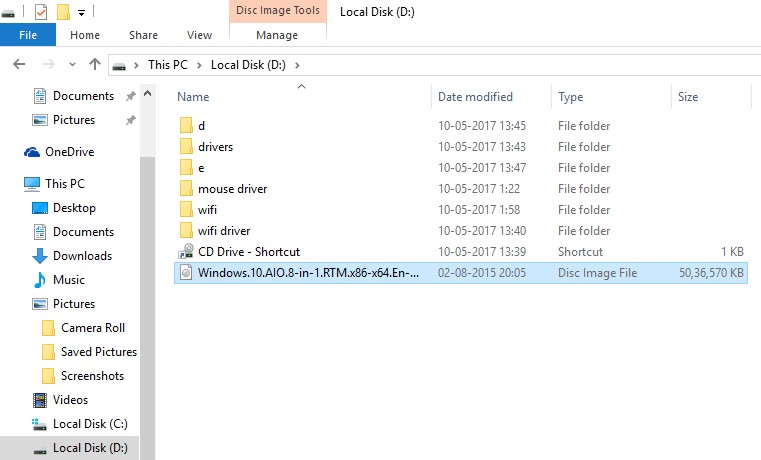
Note: – If you don’t see a “sources” folder then instead of it search for “x32” or “x64”  or “amd64” and if you find it then Double-click on the corresponding folder. (If you are currently running Windows 10 x64, then you would double-click the “x64” folder. Now you should see the “sources” folder; double-click it and then navigate to the “setup.exe” file and double-click the setup.exe file and your installation should begin.)

I hope this guide will help you to solve the error of “Use the other installation disc that says 64-bit When you insert it Windows Setup will restart automatically“. Feel free to comment for any help 🙂 Do share this post and keep visiting us.
Tags: FixWindows
ShareTweetSendPinPinShareShareSend
eTechShout Editor

eTechShout Editor

Freelancer and writer who keeps a close eye on new technologies. He writes about the best apps/games, how-to tips, tutorials especially on Android, iPhone, computers, Windows, Linux, and Mac.

Related Posts

outlook-opening-in-browser-instead-of-app-fix

Outlook Opening in Browser Instead of App? Here is How to Fix It Quickly

March 18, 2026
Easy fixes for Starbucks app not working issue on Android and iPhone phones

Starbucks App Not Working on Android or iPhone? 10 Easy Fixes That Work

March 14, 2026
Complete guide to fix Dropbox Error 400

How to Fix Dropbox Error 400 [EASY & QUICK]

January 31, 2026
Steps to fix Talkie AI not working issues including app errors, loading problems, and network failures

How to Fix Talkie Ai Not Working [7 Easy Ways]

January 21, 2026

Comments 1

  1. ج احمدی says:
    8 years ago

    That’s Great!
    Thank you

Recent Posts

Quick guide on how to fix “Not everyone can message this account” on Instagram

How to Fix “Not everyone can message this account” on Instagram

April 20, 2026
Quick guide on fixing Instagram something went wrong with your upload error on Android and iPhone devices

How to Fix Instagram “Something went wrong with your upload” Error

April 18, 2026
Guide on fixing Messenger not optimized for Android error

How to Fix “Messenger isn’t optimized for the latest version of Android” Error

April 16, 2026
Guide on changing among us name

How to Change Name in Among Us [QUICK & EASY]

April 15, 2026
Quick guide on changing TikTok date of birth

How to Change Date of Birth on TikTok [100% WORKS]

April 8, 2026
  • Disclaimer
  • Privacy
  • Contact Us
  • About Us
  • eTechShout Team

Copyright © 2026 All Rights Reserved.

No Result
View All Result
  • TECH
  • HOW TO
    • ANDROID
    • iOS
    • WINDOWS
  • TOP LIST
  • ALTERNATIVES
  • REVIEWS
  • COMPARISON

Copyright © 2026 All Rights Reserved.