These days, phone numbers mean more than just calling or texting. When someone saves your number, it usually shows that you matter to them in some way. It could be for work, friendship, or personal reasons. That is why many of us feel curious about knowing if our number is stored on someone else’s phone.
There are moments when this curiosity feels important. You might be chatting with a new person, reconnecting with someone from the past, or talking to a contact for work. Knowing if they saved your number can give a small hint about how they see you and how serious they are about staying in touch.
Even today’s latest smartphones do not clearly tell us who has saved our contact, which makes people think and guess. This topic has caught a lot of attention in recent years, and for good reason. Understanding why this matters can help you read between the lines and feel more confident in your daily communication.
The short answer is yes, you can find out if your number has been saved. That said, it is not as direct as checking a phone setting or flipping on an option. Phones do not clearly show this kind of detail. Even so, there are a few simple ways you can try to figure it out. These methods are easy to use and rely on small signs rather than official confirmation.
Below are some of the easiest ways you can use to check if someone has saved your number.
6 Easy Ways to Know If Someone Saved Your Number on iPhone and Android
Check their WhatsApp Profile and Status
If you can see someone’s WhatsApp profile photo, about and their status updates, there is a good chance they saved your number. Many people keep their privacy set so only contacts can view these details. Because of that, seeing both can be a small sign that you are in their contact list.
Now here is the part that matters most. WhatsApp status stories usually show up only when both people have saved each other’s numbers. So if their status appears on your screen, that is the strongest sign you can rely on. It is the closest thing to a clear confirmation on WhatsApp.
Check iMessage Focus Status (For iPhone Users)
If you use an iPhone, this one is worth paying attention to. When you are chatting with someone on iMessage, and you can see their Focus status like “Do Not Disturb”, it usually means your number is saved on their phone. By default, iOS shares Focus status only with contacts.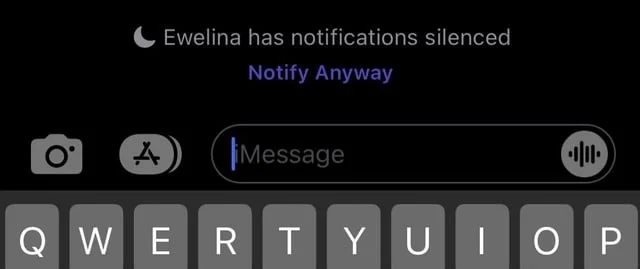
Most people never change this setting, so it stays limited to their contact list. Because of that, seeing their Focus status is a strong sign that you are already in their saved numbers.
Check their WhatsApp Links
Here is another easy trick you can try on WhatsApp. Many people add links to their profile, like a website link, Instagram, or other contact info. By default, WhatsApp shows these links only to saved contacts. Most users never change this setting in privacy options.
So if you open their WhatsApp profile and you can see any links there, chances are high that your number is already saved on their phone. It is not official proof, but it is a strong sign. I would say it is around ninety percent sure in most cases.
This works because people rarely touch their privacy settings. They just leave everything as it is. So when you see those profile links, it usually means you are already in their contact list.
Use the WhatsApp Broadcast Trick
This is one of the more reliable ways to check. WhatsApp broadcasts work only when the other person has saved your number. If your number is not in their contacts, your broadcast message will not reach them at all.
Here are the easy steps with an example.
- Let us say the person is named Ankit. First, save Ankit’s number on your phone.
- Then open WhatsApp.
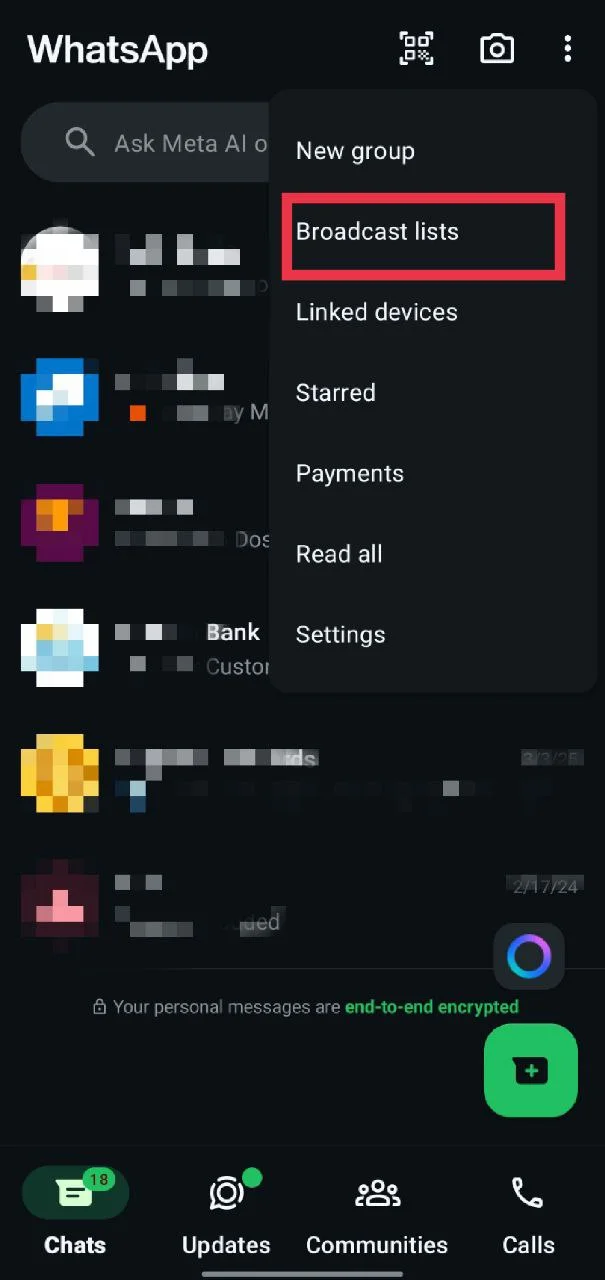
- On an iPhone, tap Contacts at the bottom of the screen and select New Broadcast from the top. On an Android phone, tap the three dots in the top right corner, choose Broadcast lists, and then tap the “+” icon to create a new one.

- Now, select Ankit, along with at least one more contact, so it stays a broadcast and not a direct chat.
- After the list is ready, send any message you like.
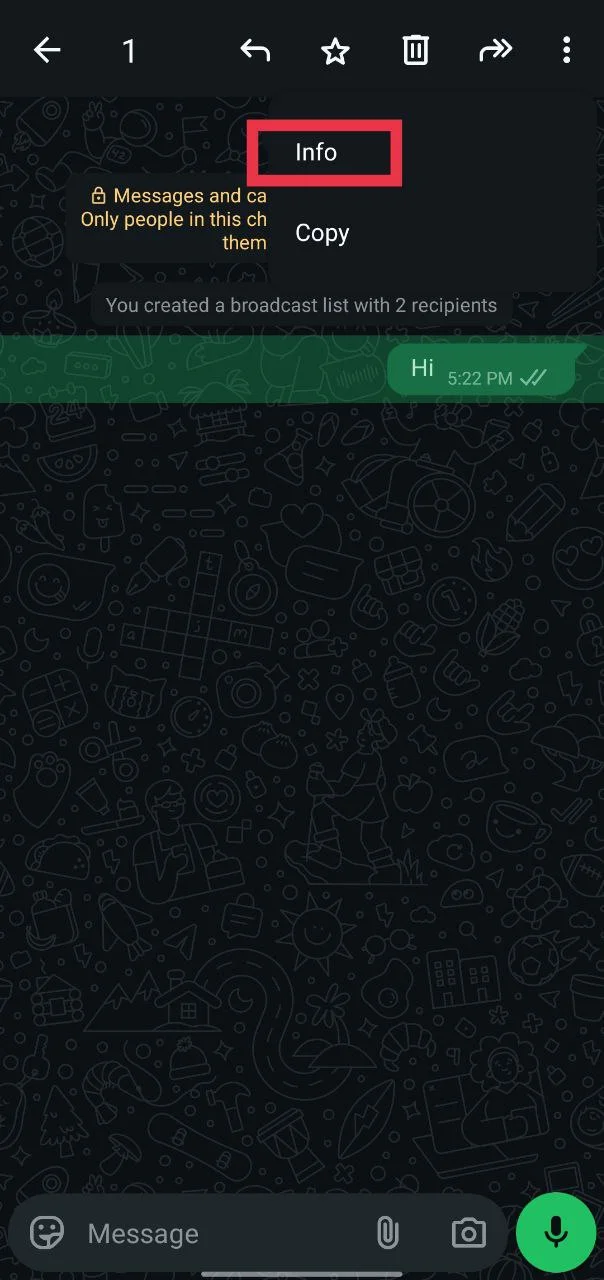
- Once it is sent, press and hold that message and tap the Info option.

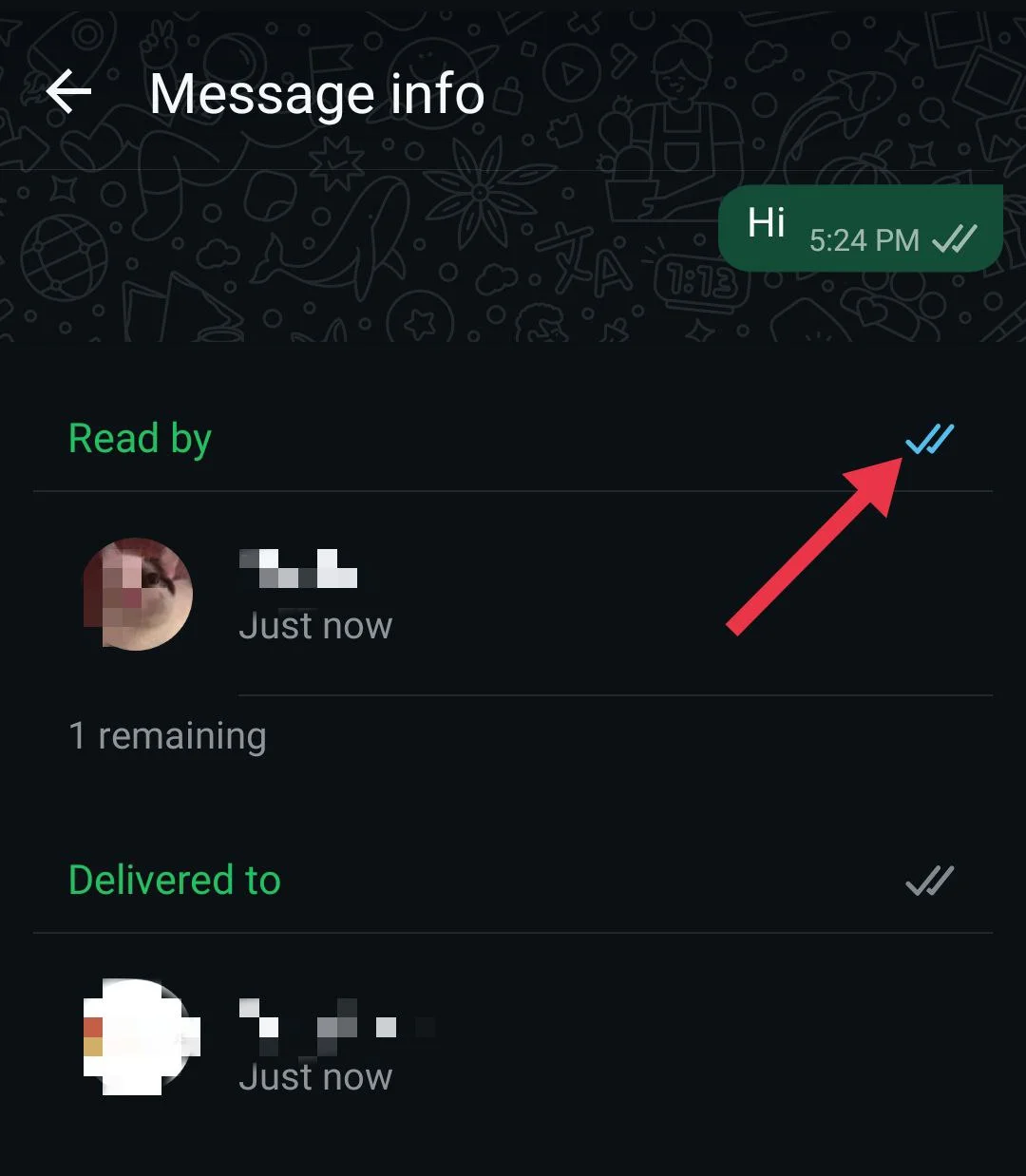
- You will see sections called Delivered to and Read by. If Ankit’s name shows up in either of these sections, it means he has saved your number. If his name does not appear at all, then your number is not saved on his phone.

Check using TikTok Contact Hints
This method works only in regions where TikTok is available. If you are in a country where TikTok is banned, like India, this option will not work at all. In places where TikTok is active, it can give a useful hint about who has saved your number.
TikTok shows a small label in the suggested accounts list that says You are in their contacts. When this text appears, it means that the person has your phone number saved. This feature works only for accounts created using a phone number, not an email, and you must be able to recognize the account owner.
- First of all, save the person’s phone number in your notes app, not in your contacts list.
- Open TikTok on your phone.
- Tap Profile in the bottom right corner.
- Open Settings and Privacy.

- Tap Privacy.
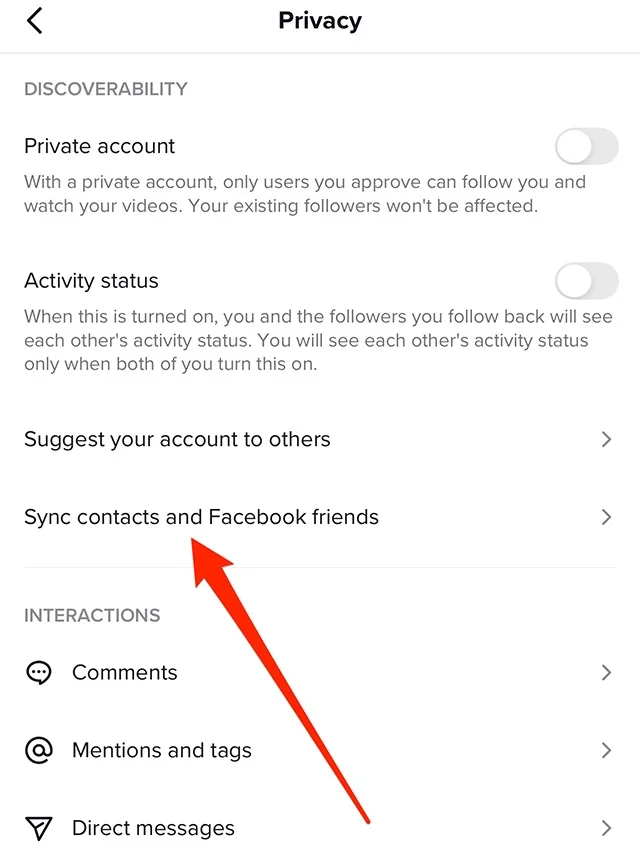
- Select Sync contacts and Facebook friends.

- Turn on Sync contacts.

- Go back to your profile page.
- Tap Following and then open Suggested.
- Now, find the profiles showing the text You are in their contacts.


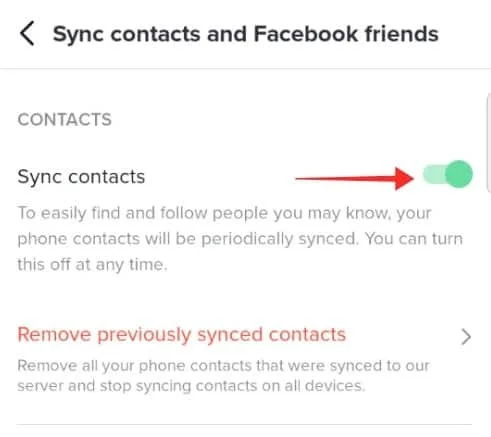
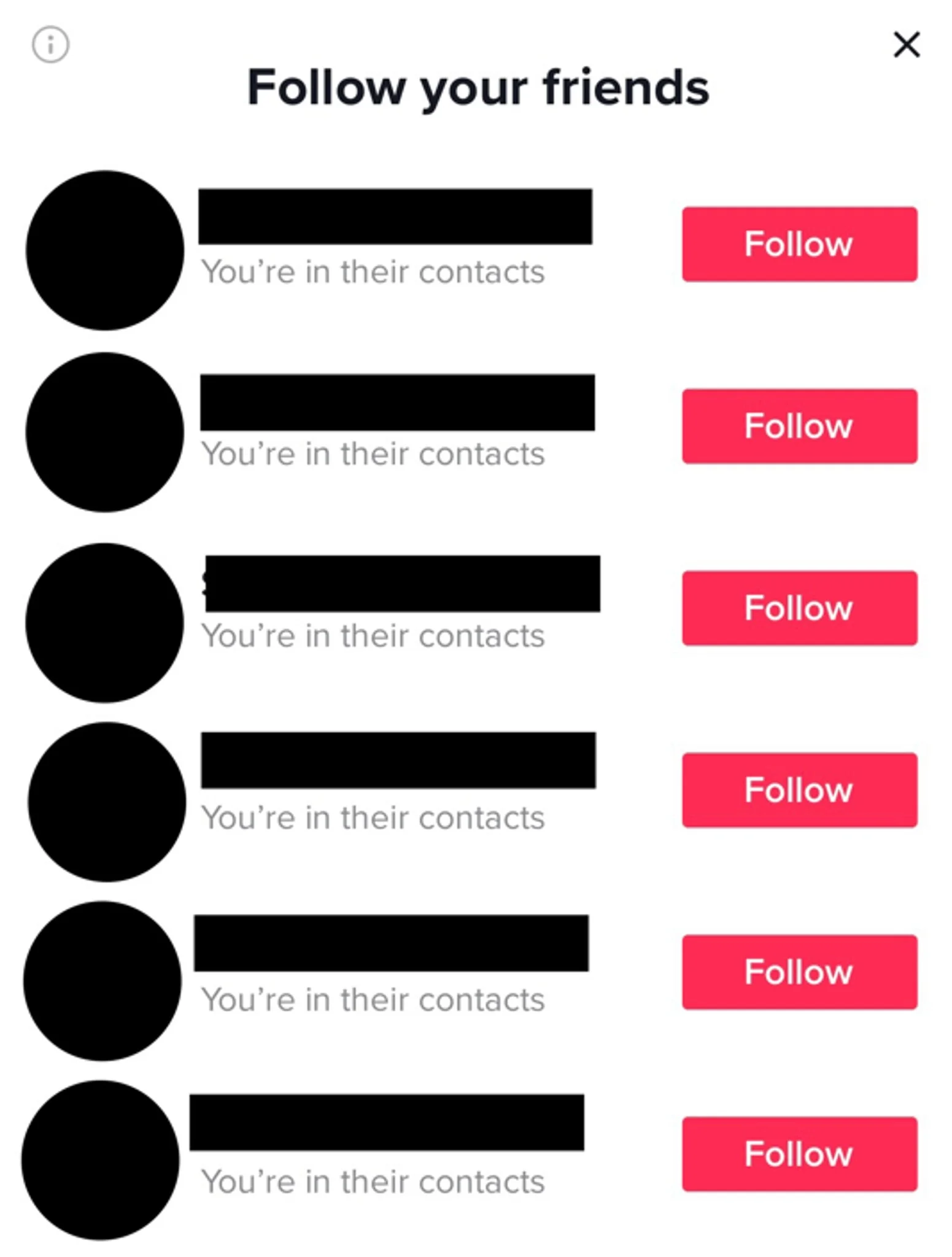
If you see this label, it means your number is saved by that person. After checking, you can add their number back to your contacts if needed.
Using Third-party Apps
You will find many apps on the Play Store and App Store that say they can show who saved your number. Apps like “Me” claim they can list people who have your contact and even display the name they used to save it. 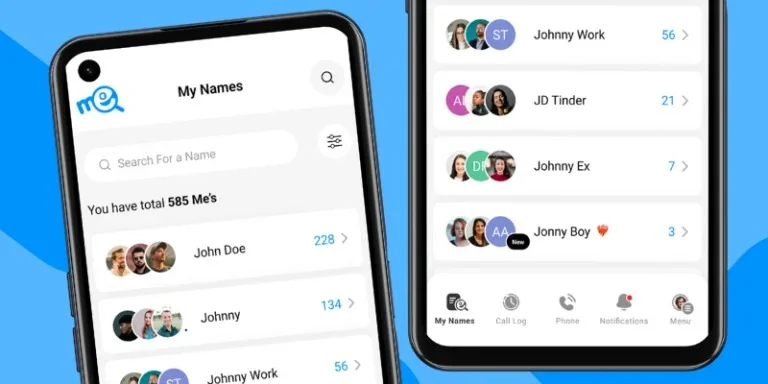
We tried a few of these apps ourselves to see how they actually work. In our testing, none of them gave clear or reliable results. Most of them kept asking to upgrade to a paid version before showing anything meaningful.
Some apps showed limited details, but only for people who also had the same app installed on their phone. That makes them useful only in very rare cases. Because of these limits, third-party apps are not a dependable way to check who saved your number.
These are some possible and working ways that can help you check if someone saved your number on both Android and iOS devices. They may not give full confirmation every time, but they do offer useful clues.
If these tips helped you or if you know any other tricks that work, feel free to share them with us.