Mega, if you are here, it probably doesn’t need an introduction. A lot of people already know what Mega is and why they use it. It is a cloud storage app where users save photos, videos, work files, and backups they care about. Many choose Mega because it feels simple to use and gives plenty of space compared to others.
Lately, many users have noticed Mega getting stuck on the loading screen. One day it opens fine, and the next day it just keeps loading without showing files. When this happens, it can feel stressful since cloud storage is all about quick access. With so many other services like Google Drive and Dropbox around today, issues like this can easily push users to look elsewhere.
If u have been using Mega for years, this loading problem matters even more. Your personal data, office files, or old backups might all be sitting there.
Since many Mega users have been reporting this loading issue, we decided to put together a list of quick solutions that have worked on both mobile and PC. These checks are easy to try and do not take much time. You can find all of them listed in the sections below and go through them one by one.
6 Ways to Fix Mega Stuck on Loading Screen Issue
Use the Mega Mobile App
If Mega is stuck on the loading screen on your browser, try accessing your account through the Mega mobile app instead. In many cases, the app continues to work normally even when the web version does not load files. This allows you to view, download, or manage your stored data without interruption. We suggest you use this as an alternative way to access your files until Mega fixes the issue or it resolves on its own.
Try Switching Between WiFi and Mobile Data
If Mega stays on the loading screen while you are using Wi-Fi, try switching to mobile data and check again. In some cases, files load fine on mobile data but stay stuck on WiFi for hours, and vice versa. These short-term internet issues can appear suddenly, so changing between Wi-Fi and mobile data might help you access your files.
Try Using a VPN Connection
The next solution to try is opening the Mega website while connected to a VPN and choosing a different country. If the site opens with the VPN but fails once you disconnect, it usually points to a regional or local network issue.
You can use free VPN services like Proton, Hide.me, TurboVPN, or Atlas for this test. Keep in mind that signing in while using a VPN may trigger a security alert email from Mega because the login comes from a new IP address.
Turn Off Browser Extensions Temporarily
A few users noticed the issue went away after disabling browser extensions for a short time. In many cases, VPN add-ons or ad-blocking extensions are the main reason the Mega page gets stuck on loading. 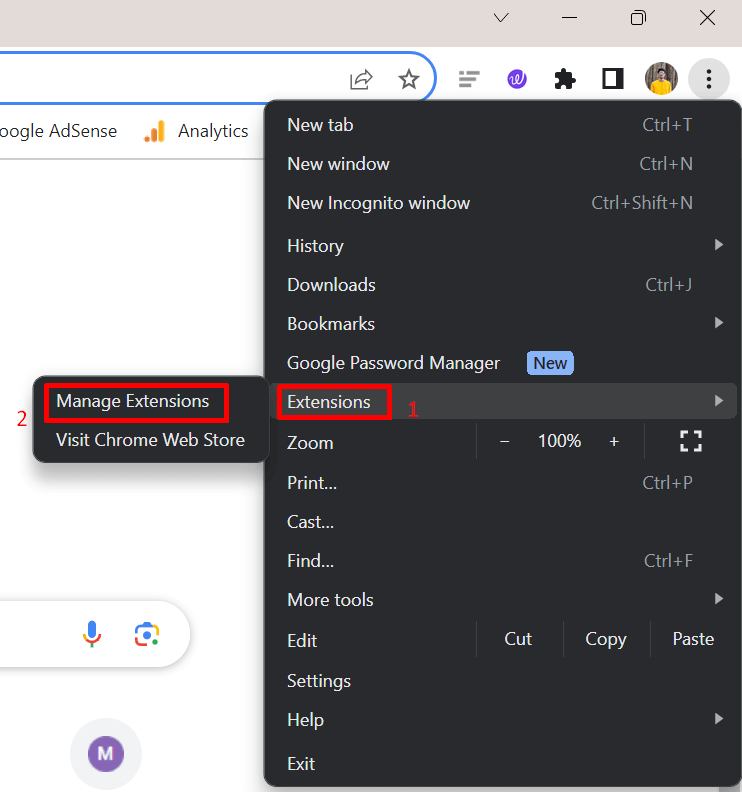
So, try turning off browser extensions one by one, mainly ad blockers or VPN tools, and check Mega again. This step is useful as a quick check rather than a permanent change.
Clear Browser Cache and Browsing History
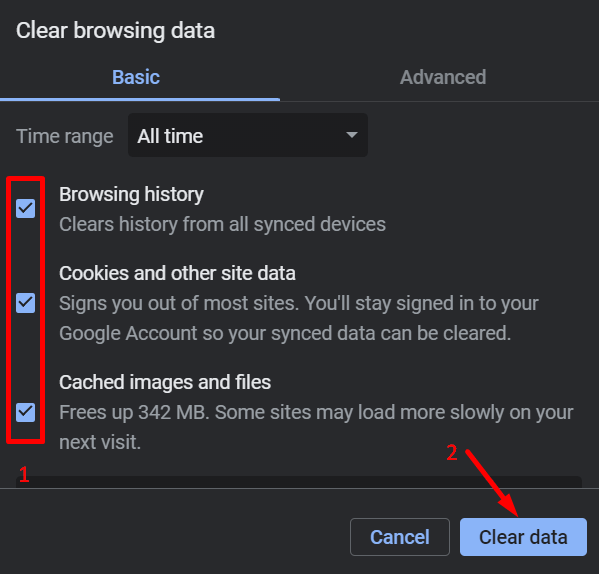
If Mega keeps loading without showing your files, try clearing the browser cache and browsing history.
Keyboard shortcuts to open the Clear Browsing Data section:
- Windows: Ctrl + Shift + Delete
- Linux: Ctrl + Shift + Delete
- Mac: Command + Shift + Delete
From there, select cache and browsing history, clear the data, and then reload the Mega website.
Try Incognito Mode or Use a Different Browser
You can try accessing the website directly in incognito or private mode. Since this mode runs without saved data, cookies, or extensions, it can help rule out browser-related issues.
If that doesn’t help, you can also try opening Mega in a completely different browser to check if the problem is limited to the one you normally use. There are dozens of trusted browsers available, so you can try one that already comes with your system, like Edge on Windows or Safari on Mac, or switch to another browser such as Firefox, Brave, or Vivaldi to see if Mega opens normally there.
RELATED:
Hope these six ways helped you fix the Mega stuck on loading screen issue on mobile or PC. If the problem is still not resolved, you can contact Mega support by emailing support@mega.nz. Just keep in mind that replies may take time since they receive a large number of emails every day. Do share which method worked for you, as it may help other readers facing the same issue.