eTechShout
  • TECH
  • HOW TO
    • ANDROID
    • iOS
    • WINDOWS
  • TOP LIST
  • ALTERNATIVES
  • REVIEWS
  • COMPARISON
No Result
View All Result
  • TECH
  • HOW TO
    • ANDROID
    • iOS
    • WINDOWS
  • TOP LIST
  • ALTERNATIVES
  • REVIEWS
  • COMPARISON
No Result
View All Result
eTechShout
Home ANDROID

How to Download WhatsApp Stories On Android

by eTechShout Editor
January 8, 2021

WhatsApp is One of the Popular Messaging App over 1 billion users in 180 Countries. It became much popular in short period because of it’s secure, simple, reliable messaging and calling service.
In 2014 Facebook bought WhatsApp, but still, it continues to operate as a separate app. However, after joining to Facebook, WhatsApp made lots of changes in their App and introduced lots of new options.

Recently they have introduced “WhatsApp Stories” feature, which is similar to Snapchat & Instagram stories. Through WhatsApp Stories, users can Share Images and Videos of 30 seconds as a Status. You may also like How to Get Duplicate Adhaar Card? If You Lost/Misplaced Original

But one main worst part of this feature is Updated Status will be deleted Automatically after 24 Hours!
So that you can’t download or Save the Images or Videos that is shared by your friends. Officially there is no option to save or Download it.

If you hate it then here is a solution. You can download WhatsApp Stories using Third party apps.
So follow below steps to Download Stories in your phone 🙂

Method 1:- (Using WhatStory App)

1) Download WhatStory App From PlayStore

2) After Installation, Open the App

3) Now Click On Any Story of your Friend that you want to Download/Save
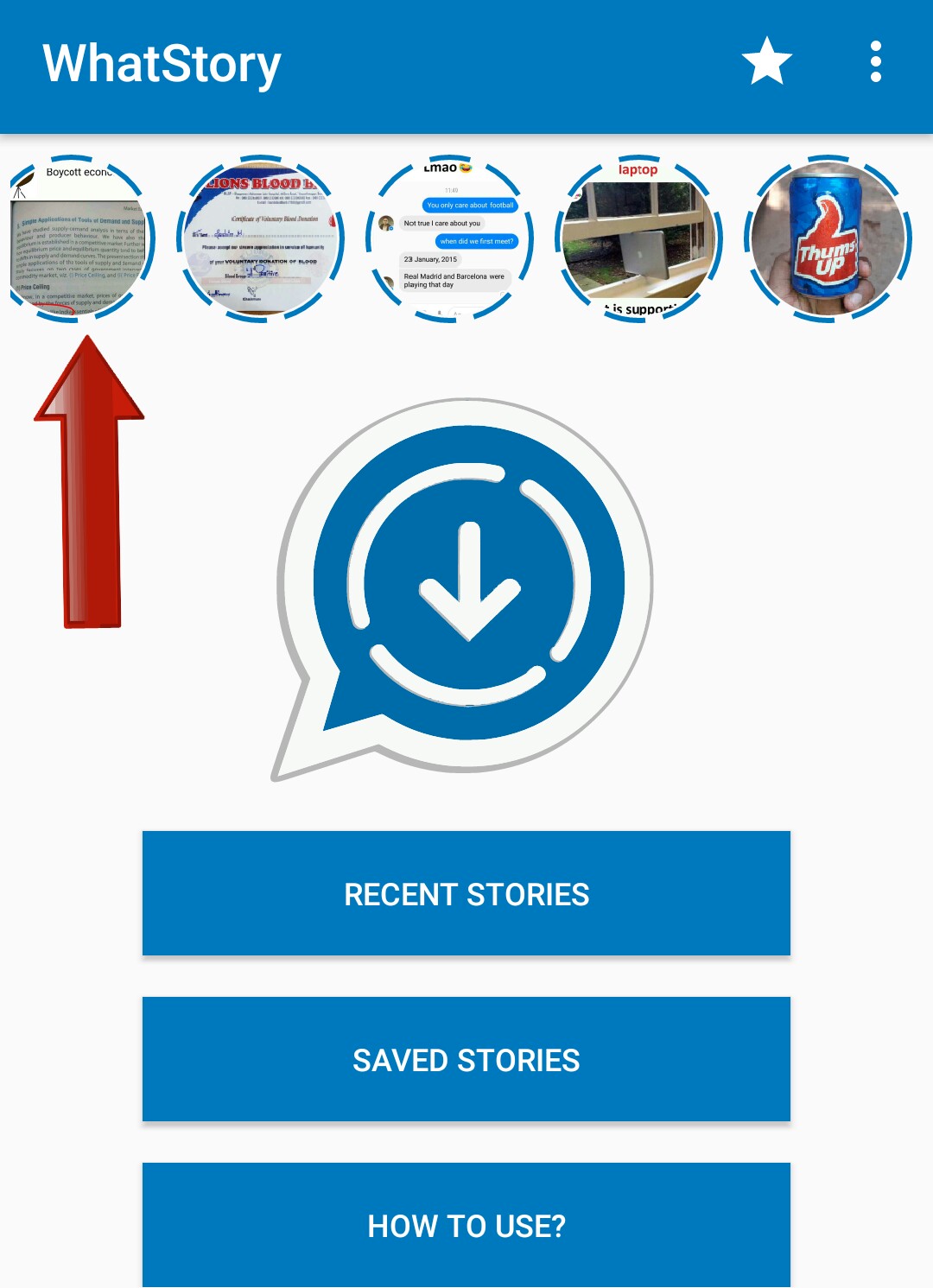
4) After Clicking you’ll get a Download icon

5) That’s it! You’ve Successfully saved Story in your gallery. You can view it anytime.

Also Read:-

Things to Consider Before Buying a Good Laptop

Method 2:- (Using Click2Chat App)

1) Download Click2Chat WhatsApp App From PlayStore

2) After installing, Open the App & Click on “Stories”
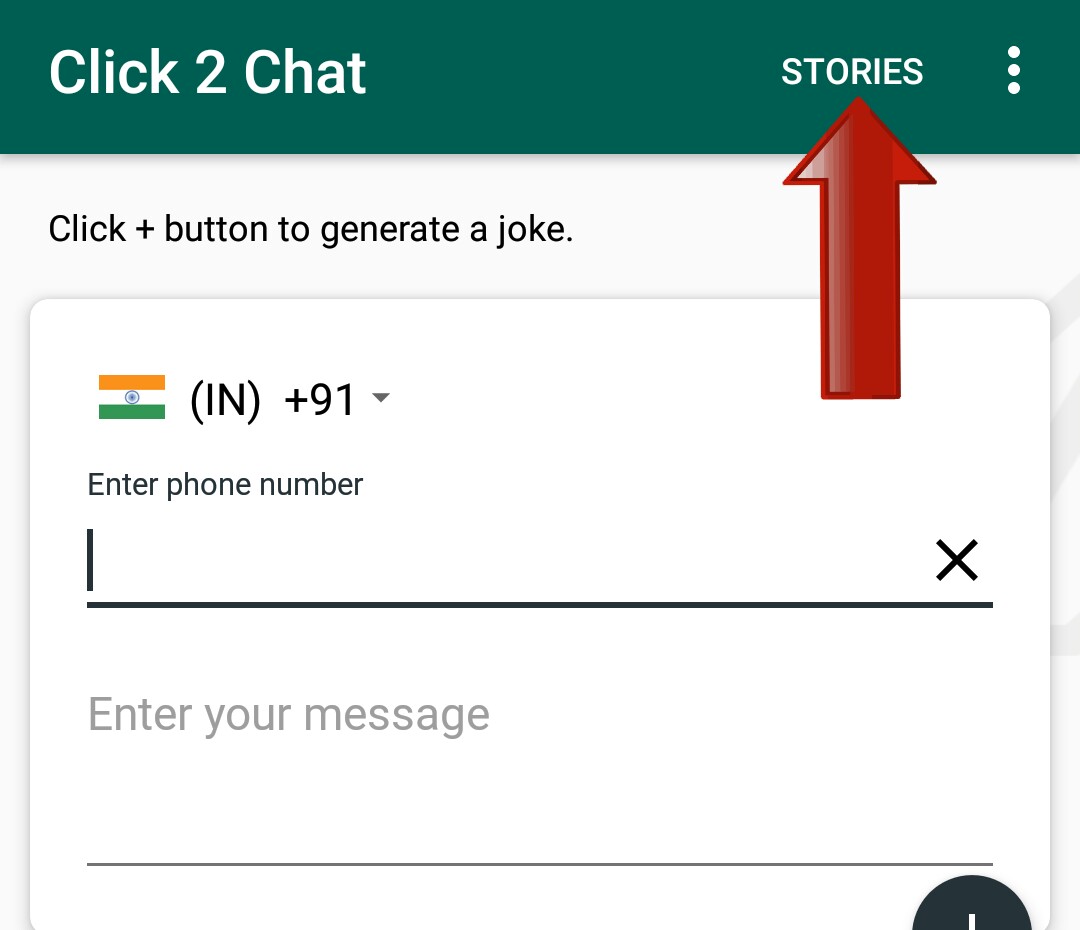

3) Now Select Story of your Friend that you like to Save it in your gallery

4) You will get an Option Of Download & click on it
5) Done! Image/Video Story Of your Friend is stored in your Gallery.

So guys, From these 2 Apps you can Download and view WhatsApp Story image or Videos of your Friend any time.

Hope you like this Article. Keep visiting us for more!
Feel free to comment for any Queries & Problem. 🙂


Tags: AndroidWhatsapp
ShareTweetSendPinPinShareShareSend
eTechShout Editor

eTechShout Editor

Freelancer and writer who keeps a close eye on new technologies. He writes about the best apps/games, how-to tips, tutorials especially on Android, iPhone, computers, Windows, Linux, and Mac.

Related Posts

Steps to know if someone saved your phone number on Android and iPhone

How to Know If Someone Saved Your Number [Android & iPhone]

January 26, 2026
Best Apps Like SoLo Funds

12 Apps Like SoLo Funds to Lend & Borrow Money (2026)

January 3, 2026
Step-by-step guide to fix WhatsApp error 'Internal storage required. Please turn off USB storage'

How to Fix WhatsApp Internal Storage Required Error [EASY 2026]

January 1, 2026
Best Watermark Remover Apps for Android iOS

11 Best Watermark Remover Apps for Android and iOS

January 3, 2026

Comments 1

  1. Anonymous says:
    9 years ago

    Thanks broder. Yourstory app is gud

Recent Posts

Quick guide to fix Spotify Connect not working

How to Fix Spotify Connect Not Working [100% Fix]

March 9, 2026
Steps to disable YouTube Video paused Continue watching message

How to Disable YouTube “Video Paused. Continue Watching”

March 9, 2026
Easy guide to fix iPhone keyboard keeps switching issue when using SwiftKey, Gboard, or other third party keyboards

How to Fix iPhone Keyboard Keeps Switching Issue

March 4, 2026
Troubleshoot "Unable to Load Camera Roll" error on Facebook Messenger

How to Fix ‘Unable to Load Camera Roll’ on Facebook Messenger

February 25, 2026
Quick guide on how to fix the “Sign in to confirm that you're not a bot” error on YouTube

How to Fix “Sign in to confirm that you’re not a bot” on YouTube [100% WORKS]

February 24, 2026
  • Disclaimer
  • Privacy
  • Contact Us
  • About Us
  • eTechShout Team

Copyright © 2026 All Rights Reserved.

No Result
View All Result
  • TECH
  • HOW TO
    • ANDROID
    • iOS
    • WINDOWS
  • TOP LIST
  • ALTERNATIVES
  • REVIEWS
  • COMPARISON

Copyright © 2026 All Rights Reserved.