eTechShout
  • TECH
  • HOW TO
    • ANDROID
    • iOS
    • WINDOWS
  • TOP LIST
  • ALTERNATIVES
  • REVIEWS
  • COMPARISON
No Result
View All Result
  • TECH
  • HOW TO
    • ANDROID
    • iOS
    • WINDOWS
  • TOP LIST
  • ALTERNATIVES
  • REVIEWS
  • COMPARISON
No Result
View All Result
eTechShout
Home ANDROID

How to Increase WhatsApp Status Video Limit of 30 Seconds?

by eTechShout Editor
February 3, 2022

whatsapp-status-limit-bypass


WhatsApp introduced the Status feature recently, although it is a copy of Snapchat’s feature, it became popular among WhatsApp users. Now every user WhatsApp is filled with a huge amount of Status because most of the user starts their morning with a glimpse of WhatsApp.

Most of the user complaint is that though WhatsApp status feature we can post an only 30-second video. WhatsApp restricted the limit of posting video status to 30 seconds only. So as you know you can’t post a video more than 30 seconds in your WhatsApp status. Whenever you try to update the video status WhatsApp will ask you to trim the video to 30 seconds. Officially there is no way to post videos of 30 seconds.

If you hate this limit of 30 seconds, then you are in the right place. Here we are going to explain some ways to post videos of more than 30 seconds in status. By following these steps you can bypass the WhatsApp status video limit.

  • How to Increase WhatsApp Status Limit Without Root?
  • How to Increase WhatsApp Video Status Limit With Root?

How to Increase WhatsApp Status Limit Without Root?

#Method 1

  1. First of all download, an app called Video2Me From Playstore by clicking here
  2. Click on install and wait for the completion of the download
  3. After successful installation open the app
  4. Now click on GIF from the home screen of the app Disable-whatsapp-status-limit
  5. In the next step select Video2Gif post-long-video-whatsapp-status
  6. Now select the video of more than 30 seconds that you want to post in WhatsApp status
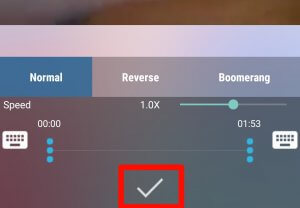
  7. Click on the Right mark and wait for the completion of the process Bypass-video-limit
  8. That’s it. After completing the process, it will save into your gallery
  9. Now go to WhatsApp status and select the GIF that you’ve converted and Click on the send button
  10. Enjoy! You have successfully increased the WhatsApp status limit without root.

Note: – If you use this method then after converting Video into GIF you’ll not get audio of that particular video. Still, it may help you in some situations.

Also Read: – How to Read Recalled Messages On WhatsApp?

How to Increase WhatsApp Video Status Limit With Root?

#Method 2 (Root Required)

  1. You must have a rooted device to use this trick
  2. If your device is already rooted, Download WA Tweaks from here
  3. Install the app manually and open it
  4. Grant root access to the WA Tweaks
  5. Now click on the menu from the left corner and then select WhatsApp Tweaks
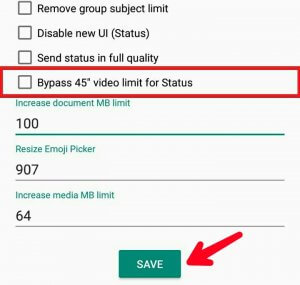
  6. You can see the option of Bypass 30-second video limit for status Whatsapp-video-status-increase
  7. Just Tick on that option and click save
  8. Now go to WhatsApp and click on Status then select any video of more than 30 seconds to post
  9. That’s it. You have successfully bypassed the 30 seconds limit.
Also  Read: – How to Download WhatsApp Stories On Android

So guys, by following the above methods you can disable WhatsApp status 30 seconds limit on android. What do you think about WhatsApp status video limit increase methods? I hope these methods will help you to increase the WhatsApp status video limit. Do share your views in the comments section.


Tags: AndroidVideoWhatsapp
ShareTweetSendPinPinShareShareSend
eTechShout Editor

eTechShout Editor

Freelancer and writer who keeps a close eye on new technologies. He writes about the best apps/games, how-to tips, tutorials especially on Android, iPhone, computers, Windows, Linux, and Mac.

Related Posts

How to fix WhatsApp “Please wait a moment. App maintenance in progress” error on Android and iOS

How to Fix WhatsApp “Please wait a moment. App maintenance in progress”

August 25, 2026

How to Fix VLC Media Player Slow to Open (Windows 10 & 11)

August 24, 2026
Featured image for a guide showing how to fix the "Can't verify face. Hardware not available" error on Android phones

How to Fix “Can’t verify face. Hardware not available” Error on Android

August 5, 2026
Complete guide to fix the WhatsApp "Unable to restore your chats from this backup" error on Android and iPhone

How to Fix WhatsApp “Unable to restore your chats from this backup”

July 17, 2026

Recent Posts

How to fix Due to Local Regulations this Content is Restricted on X

How to Bypass “Due to Local Regulations, This Content Is Restricted on X”

September 25, 2026
How to Fix Facebook Marketplace Not Working guide

How to Fix Facebook Marketplace Not Working on Any Device

September 24, 2026
How to fix Instagram Add Mentions Not Showing on Any Device

How to Fix Instagram Add Mentions Not Showing

September 22, 2026
How to fix Telegram “Too many attempts, Please try again later” error

How to Fix Telegram “Too many attempts, Please try again later”

September 21, 2026
How to fix AnyDesk desk_rt_ipc_error on Windows, Mac, and Linux

AnyDesk desk_rt_ipc_error? Try These Fixes for Windows, Mac & Linux

September 17, 2026
  • Disclaimer
  • Privacy
  • Contact Us
  • About Us
  • eTechShout Team

Copyright © 2026 All Rights Reserved.

No Result
View All Result
  • TECH
  • HOW TO
    • ANDROID
    • iOS
    • WINDOWS
  • TOP LIST
  • ALTERNATIVES
  • REVIEWS
  • COMPARISON

Copyright © 2026 All Rights Reserved.