WeChat has grown into a huge app that people across the world use to chat, call, and stay connected. At the same time, it has also been banned in several countries, including India. If you have landed here, chances are you are stuck with a problem inside the app. One of the most common issues many people face is being unable to obtain verification code on Wechat. This code is very important because without it you cannot sign in to your account. It usually pops up when you install WeChat for the first time, reinstall it on your phone, or move to a new device.
We have put together some solutions based on our own experience and tips shared by other users who went through the same problem.
How to Fix WeChat Verification Code Not Received Issue Easily
Try Using Mobile Data Instead of WiFi
A lot of times, the verification code just refuses to show up when the phone is connected to WiFi. A simple trick that works for many people is to switch off WiFi and use mobile data instead. When the request goes through your mobile network, the code usually comes without much delay. So before you try again, turn off WiFi and make sure mobile data is active.
If you have your hotspot turned on, go ahead and switch it off. Others have also shared the same experience, so you might want to give it a try.
Check Spam or Blocked Messages
Even if you have never blocked SMS or the WeChat sender, there is still a chance that apps like Google Messages or Truecaller are filtering your verification code. These apps are useful for stopping spam, but sometimes they push important messages like OTPs into the spam or blocked folder by mistake. I even came across a case where a user’s WeChat codes were sitting in the spam section of Google Messages without them realizing it.
As a workaround for this, open the Google Messages app, tap on your profile icon in the top right corner, and select “Spam & blocked.” 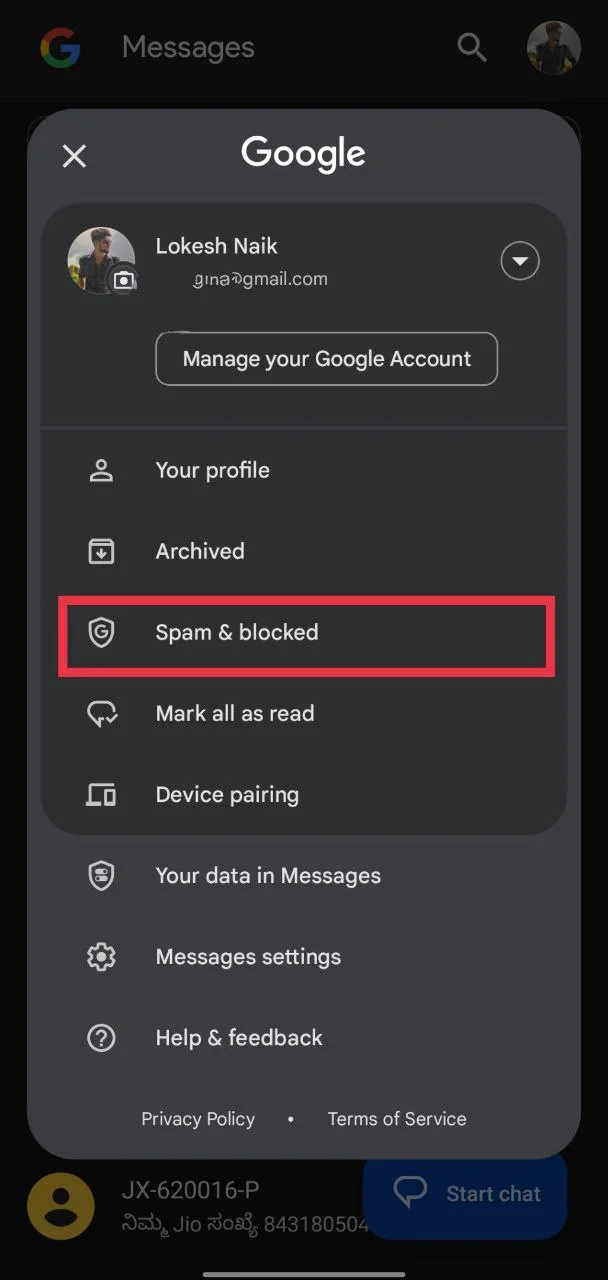
Look carefully to see if the WeChat code is there. If you use Truecaller or any other app set as your default SMS app, check their spam or blocked section too. In some cases, uninstalling these apps while registering on WeChat has also helped people receive their codes normally.
Check Your Phone Number and Avoid Requesting Too Many Codes
First, make sure the mobile number you typed in is correct. After you choose the right country or region, you do not need to add the country code again in front of your number. Also, remember that landline numbers will not work, so you must use a mobile number.
Another thing to keep in mind is how often you request the code. Many people, after entering a wrong number or facing the WeChat verification code not received issue, keep pressing the button again and again to get a new verification SMS. WeChat has a daily limit on how many codes can be sent to the same number, so if you cross that limit the messages will stop coming. If that happens, the only option is to wait a while before trying again.
Make Sure the Correct Region is Selected
One simple mistake that can stop the verification code from arriving on WeChat or any other app is choosing the wrong country or region when entering your phone number. We often select the wrong option in a hurry while registering, and that small slip can keep the code from reaching your phone. Even if the number itself is correct, the app will not send the code if the region in front of it is set incorrectly.
This can also happen if you are traveling or staying in another country for work or a trip. Since WeChat requires you to select the right country code before entering your number, it is important to double-check this step. Make sure the region matches the actual number you are using, and then try again.
Make Sure Your Phone Can Receive SMS Messages
Before blaming WeChat, it is worth checking if your phone can actually receive normal SMS messages. An easy way to test this is by sending a text to your own number from another phone. If the message arrives, then your SMS service is working fine.
If the message does not arrive, the issue might be with your mobile network. It could be because the signal is weak, your number is in roaming, your balance or credit has run out, or your service is temporarily inactive.
Contact WeChat Support
By now, the problem of the WeChat verification code not showing up should hopefully be fixed. If it is still not working, then the issue might be linked to your account itself. In that case, the best option is to reach out to WeChat support. 
You can do this by filling out the official feedback form here: WeChat Help Center. When you open the form, choose “Unable to login” as the category and “Unable to receive sms code” in the next category, then describe the issue clearly in the description box and submit it. Be ready to wait, though, because their replies usually take a long time and are not always very quick or helpful.
We hope this guide helped you fix the WeChat verification code not received problem. Were you also facing the unable to obtain verification code on WeChat issue? If yes, let us know which method worked for you. Also, if you have found any other way that solved the issue, do share it in the comments so that others can try it too.