Instagram has come a long way from being just a place to share photos. Today, Stories let you share moments with friends, mention people directly, and give them a chance to repost those Stories on their own accounts.
For anyone who uses mentions regularly, the Add Mentions button is a useful part of the Story features. A mentioned person receives a notification in their direct messages and can share the Story as a sticker, resize it, rotate it, or place it wherever they want. The original poster’s username also stays visible and tappable.
Lately, some Instagram users have noticed that the Add Mentions option is missing from their Stories. The same issue can appear even on business accounts, which naturally raises a question: why is the Add Mentions button not showing on Instagram? Below, we’ll look at some Instagram settings you may need to check to fix this issue.
How to Fix Add Mentions to Instagram Story Not Showing
Reinstall Instagram App
One thing you can try is removing Instagram from your phone and installing it again. Before reinstalling, restart your phone after uninstalling the app. Once the phone is turned on, download Instagram again and sign in to your account. Now open Instagram and create a Story to check the mention options.
Update Instagram App
An older or buggy Instagram version can sometimes have missing or changed features, including the Add Mentions option. So, open the app store, check for Instagram update. After updating, check your Story again and see if the option has returned.
Add the Mention Before Posting
You can also add the person while you are creating the Story itself. Once you have your photo or video ready, use the text tool and type @username to mention the account directly.
Another option is to tap Stickers, choose Mention, and then select the account you want to tag. Adding the mention before posting means you do not have to rely on the “Add Mentions” option after the Story is already live.
Look for the New @ Button
After posting your Story, you may notice that the old Add Mentions option is no longer in the three dots menu. Instagram has changed where this option appears for some users, so the new @ button may be the option you need.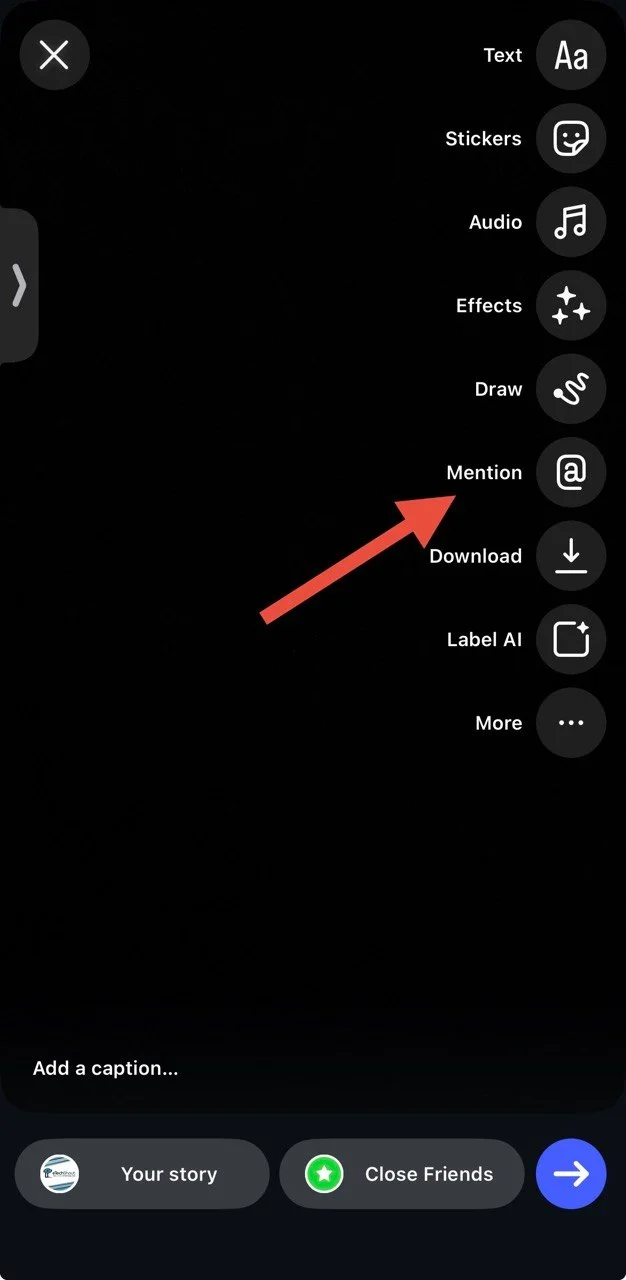
In that case, take a look at the toolbar at the bottom of the Story and check for an @ icon. Tap the @ button and search for the username you want to mention. Select the account and add the mention to your Story.
Check Privacy and Mention Settings
Your Instagram privacy settings can also affect how mentions work. Open Settings & privacy > Tags and mentions > Allow mentions from everyone or at least Allow mentions from people you follow.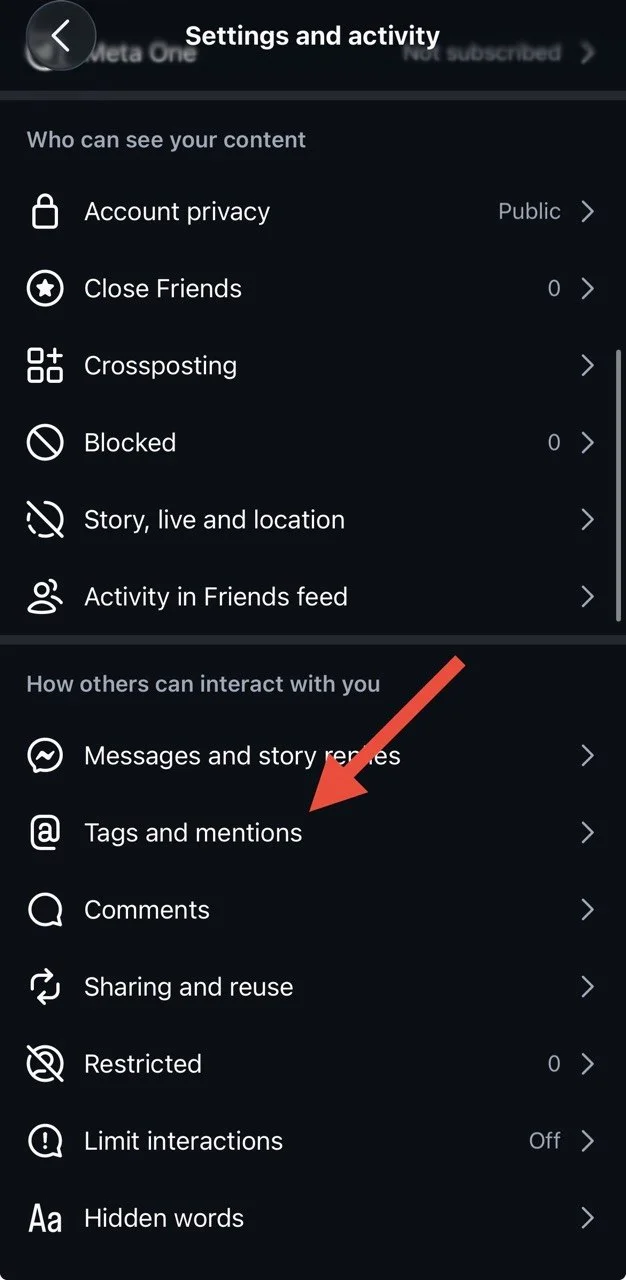
It is also worth checking Messaging & story replies. Make sure your settings are not restricting replies in a way that affects the normal mention options.
Test Instagram on Another Device or Account
This solution can help narrow down where the issue is coming from. Try opening the same Instagram account on another phone and check the Story options there. You can also sign in to a different Instagram account on your current phone and see if the Add Mentions option appears.
If the button appears on another device or account, the Instagram on your phone may be the cause.
The Add Mentions option may look different depending on the Instagram version or account you are using. If you are dealing with Instagram add mentions not showing, the methods above can help you find where the issue is coming from and bring the option back. Once you find a method that works, do share this article with others facing the same issue and let us know which method worked for you.