Our article below provides a FILCA app review, outlining all the app’s key features, price, requirements, and tutorial. Check it out and decide whether it’s worth a try for yourself.
FILCA – SLR Film Camera is a popular iPhone camera app that is used by thousands of users across the world.
If you haven’t heard about the FILCA app for iPhone, you should definitely give it a try. FILCA camera app is poised to become one of the most popular photo apps on the iOS app ranking 15th in the Photo & Video on the Apple app store.
In this FILCA app review, we will provide you with all the information you need about the popular FILCA – SLR Film Camera app before investing your money. Read along for our full FILCA app review.
FILCA SLR Camera App Review
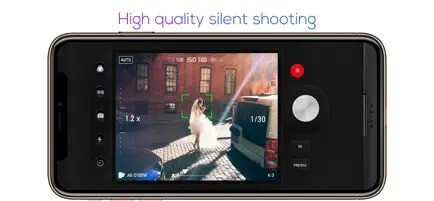
Most people these days want their photos to look like they are into a film using a smartphone. FILCA is one such iOS app that has several useful features including professional manual operation and a silent shooting function that lets mobile photographers directly take great pictures from their smartphone.
However, it takes some time to master FILCA to take great photos. This app, priced at $3.99 for iOS caters to mobile photographers who appreciate the high-quality silent shooting mode, and manual controls.
What is FILCA SLR App?
FILCA developed by Cheol Kim, is a popular iPhone camera app that blends digital camera and film sensitivity. The app is made for taking photos of people, self-portraits, night scenes, and everyday sports moments.


FILCA App Features
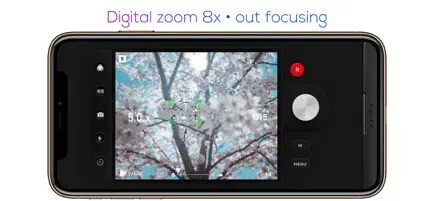
The FILCA – SLR Film Camera app has many different features, too many to mention in this FILCA app review, however, the following are probably the most useful ones:
- Manual mode for shutter speed
- ISO, white balance control
- Shutter speed, ISO can be controlled fully manually
- Automatic mode camera with 35mm film filter
- Digital zoom 8x (magnification up to 8x)
- Fuji, Kodak, Agfa 36mm film filter (black and white filter)
- Various effects
- Optical Image Stabilization
- Power-saving mode
- Functions of the timer and flash
- Modes like self mode and grid mode
- Various aspect ratios 4:3, 3:2, 16:9, 1:1


FILCA App Pricing
FILCA App costs $3.99 for iOS devices and there are multiple in-app purchases available including:
- UPGRADE PRO VERSION – $99.99
- UPGRADE PRO – $6.99
- KODAK SERIES FILM – $5.99
- RETRO SERIES FILM – $4.99
- FUJI SERIES FILM – $4.99
- IU SERIES FILM – $4.99
- LOMO SERIES – $4.99
- WEDDING SERIES FILM – $4.99
- UPGRADE PRO – $29.99
FILCA App Requirements
- iPhone – Requires iOS 13.0 or later.
- iPod touch – Requires iOS 13.0 or later.
How to Use Filca App?
If you are looking for a Filca app tutorial, then it is not required. The app has a simple user interface that is quite clean.
Since there are loads of options and manual modes on the app it confuses normal users. Once you are able to play around with the FILCA Camera app for some time, the app will quickly impress you.
The different features will take some time to get used to, but once you get used to them, you’ll really enjoy them. There are a lot of filters and manual options to choose from, and they are unique.
Conclusion: FILCA App Review
The biggest issue we had with the FILCA app is that, despite having everything you could possibly need to take photos and manipulate them, you cannot save how you manipulated them without purchasing a pro upgrade.
There are some things you can manipulate with this photo app, but if you’re interested in adding effects such as different film stocks for a cool photo film look, then you’ll have to upgrade and pay to save them. Moreover, the app lacks a function that allows users to import photos from the photo library to add effects.
FILCA SLR film camera app has some great controls, but it can’t be used without upgrading due to the constant ads that appear every 15 seconds.
With that said, the in-app purchase model does not make sense. It would be a lot more convenient if all the features were included in the Pro version and available in a single purchase.
Frequently Asked Questions (FAQs)
Is the FILCA app safe?
The Filca SLR app is legit and safe.
Is FILCA app free?
You can install the app by paying $3.99 on your iPhone and use the basic features for free. There are lots of in-app purchases inside the app as well.
What are some FILCA alternatives?
Filca SLR camera app alternatives are FotoX, Filcaso, RECO, and Filmlike Date Stamp.
What is the best film camera app for iPhone?
Some of the best vintage iPhone camera apps are Huji Cam, CALLA, Gudak, KD Pro, and Hipstamatic X.
Here we conclude the review of the FILCA app. If you are passionate about phone photography or vintage cameras, consider downloading this app. It would be a great choice for anyone looking for an app with a lot of film camera options.
Hopefully, our Filca app review can help you decide whether it’s a good option for you or not.