In this article, we’ll show you how to pin a comment on TikTok live. These instructions are applicable to both iOS and Android versions of the TikTok app.
Did you get anything memorable in your TikTok live comments section? Have you seen anything funny or interesting in the comments? Is there something you would like to announce on your TikTok live? Why not make that comment the first thing people see on your TikTok live by pinning it to the top of the stream? Here’s how to pin comment on TikTok live.
There is nothing worse than comment sections on social media, particularly on popular apps like TikTok, and Instagram. The purpose of the pin comment feature is to encourage positive interactions and thus TikTok allows you to pin a comment.
It is possible to pin comments from your followers/commenters, as well as your own comment. Whenever a comment is pinned, it will always appear above the other comments. Whoever is watching your TikTok Live will see it first and it will be the very first comment they will see when they open the live.
As soon as you pin someone’s comment on your TikTok live, the comment appears at the top. In fact, this is an excellent way to highlight the most valuable and engaging comments made by your follower or you on your TikTok live. This feature is also available on YouTube, Instagram, and some other popular apps.
TikTok recently added the ability to pin comments on TikTok Live. You can use this to inform people about the video’s purpose since not everyone will be able to join the live stream from the beginning. Thus, by pinning the comment on TikTok live, the latecomers will be able to see what you’re saying when they join.
If you want to learn how to pin comment on TikTok live, you’re in the right place. We provide a step-by-step guide to pinning comments on TikTok live.
How to Pin a Comment on TikTok Live
- In order to test out the TikTok live pin comment feature, make sure you have the most recent version of the TikTok app (Android/iOS)
- Now, open the TikTok app
- After that go live on the app. To do this click on the create (+ plus icon) in the middle of the home screen

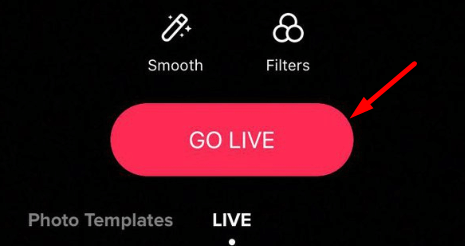
- Now, go to the Live tab and click on Go LIVE

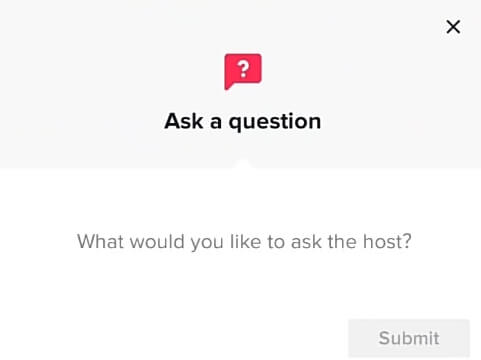
- As soon as your followers join your live, you’ll need to wait for them to comment. To make comment your follower needs to click on the question mark ? icon

- Then they can publish their comments on your TikTok live

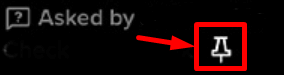
- Once you get comments, you’ll be notified in the chat that someone has asked a question.
- To pin a comment, click the pin icon next to the question.

- That’s it! You’ve pinned comment on your TikTok live.


Frequently Asked Questions (FAQs)
How do you pin a comment on TikTok?
In order to pin a comment on TikTok live, click the pin icon next to the question once someone comments on your live stream.
How do you pin a comment on someone’s TikTok live?
Unfortunately, only the host can pin a comment on TikTok live. If you have made a comment on someone else’s live, only they can pin your comment. You can’t do anything other than ask them to pin your comment.
Can I change the pinned comment on TikTok?
If you wish, it is possible to change which question is pinned. To have another question or comment pinned, ask another viewer to leave that comment on your live.
How many comments I can pin at a time on TikTok live?
Please keep in mind that you can only pin one comment at a time. When you pin a new comment, any comment you’ve already pinned will be unpinned.
How to unpin a comment on TikTok live?
When you want to remove a pinned comment from TikTok live, you need to click on the unpin icon pinned comment. This will unpin the comment that is already pinned.
By pinning a comment you received on your TikTok live, you can display your most important comment at the top of your stream. The pinned comment appears at the top no matter how many comments are added afterward.
When you get new comments, the older comments you got are pushed down and become less noticeable. In order to prevent this from happening with the most important comment, you can pin that comment to the top of your live stream of TikTok.
In this way, your selected comment will always appear at the top of your TikTok live. The position of your pinned comment will not be changed by any comments your followers/fans post afterward.