Instagram’s constant updates and changes often leave users wondering about various features. The platform’s note-sharing capability has sparked particular interest among its massive user base, with many questioning the rules and limitations surrounding this feature.
Many Instagram users are confused about how Notes works on the app. They want to know if restricting someone’s account will stop them from seeing their Notes.
Instagram Notes are like short messages that people can share with their friends. These messages appear at the top of the direct message inbox. Users often write quick updates or share their thoughts using Notes.
More and more people are using Notes on Instagram every day. But they have questions about who can see their Notes and who cannot. They also wonder if restricting someone or making their account private changes how Notes work.
We will look at exactly what happens to Notes when you restrict someone on your Instagram account. This will help you understand who can read your Notes and how to control who sees them.

Does Restricting on Instagram Hide Notes?
Yes. When you restrict a user, they can’t see your Notes that appear at the top of their direct messages inbox. Also, it limits what they can do with your posts. Their comments will be hidden from other people – only you and the restricted person can see what they write. This helps keep your Instagram account free from unwanted replies to notes, comments to posts, or stories and makes your experience on the app more peaceful.
What Happens When You Restrict Someone on Instagram?
When you restrict someone on Instagram,
They can still:
- See your posts and stories
- Send you messages
- Write comments
- Follow your account
But these changes take place:
- Their comments are hidden from other people (only they can see them)
- Their messages go to a separate request folder
- They can’t see when you’re online
- They won’t know if you’ve read their messages
- You won’t get notifications about their activity
The best part is that the person you restrict won’t know you’ve restricted them. It’s like putting them on quiet mode without blocking them completely. This helps you manage unwanted interactions without creating conflict. You can always remove the restriction later if you want to.
How to Hide Instagram Notes From Certain Followers?
Instead of restricting someone to hide your notes from them, you can simply make specific notes hidden from them. You can choose who sees your Notes on Instagram without restricting them. Instagram lets you hide Notes from specific followers by changing a few settings. Notes only stay visible for 24 hours, and you can control exactly who gets to see them.
To hide Notes from specific followers:
- Open your Instagram app.
- Compose a note (up to 60 characters).
- Tap the dropdown icon labeled “Share with.”

- Choose “Close Friends.”

- Select only the followers you want to share the note with, leaving out those you want to hide it from.
- Tap “Done” and share your note.
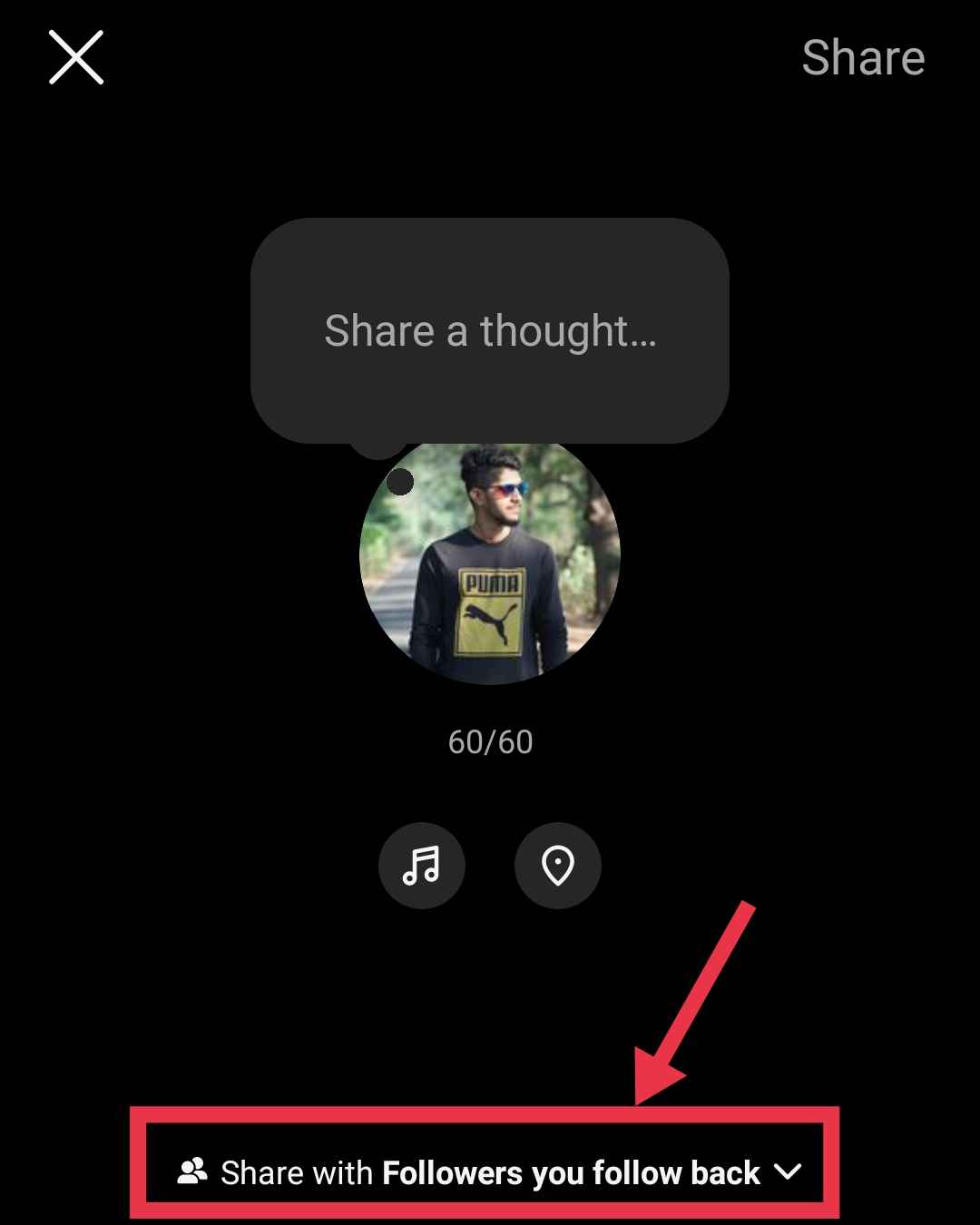
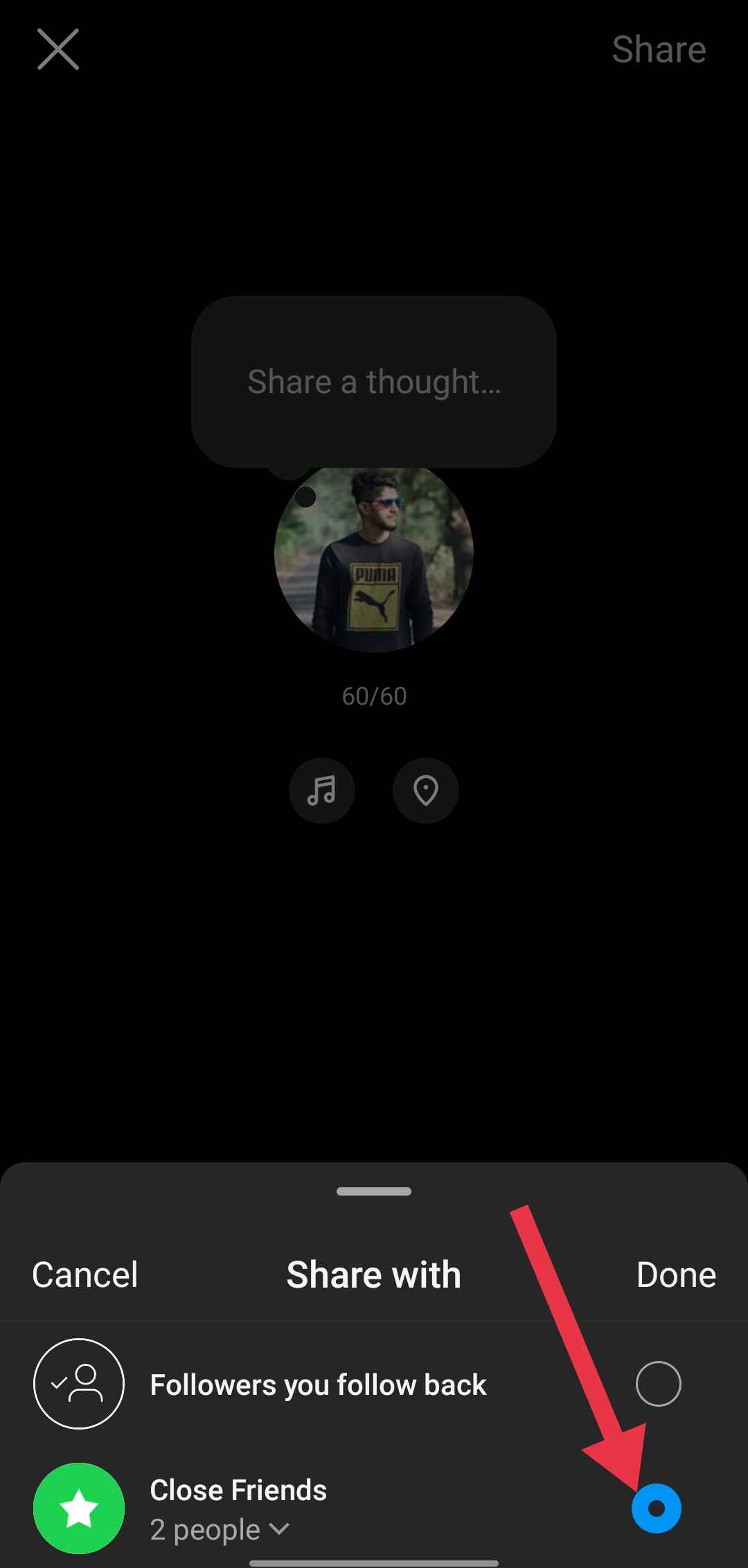
Once you do this, only your selected close friends will be able to see your note.
How to Restrict Someone On Instagram
Through Their Profile
- Open Instagram on your phone
- Find the person by typing their name in the search bar
- Tap their profile picture to open their profile
- Click on the three dots (⋮) at the top right of their profile
- Tap “Restrict” from the menu.


Through Settings
- Go to your profile
- Tap the menu (three lines) in the top right corner

- Scroll down and tap on “Restricted“

- Search for the person’s username

- Tap “Restrict” next to their name.


To remove the restriction later, follow the same steps but tap “Unrestrict” instead. 
We hope this article cleared up any questions about whether restricting on Instagram hides notes and other restriction-related questions you had in mind. Let us know if you need further information, and feel free to share this with others!
- RELATED GUIDE: – How to Know If Someone Restricted You on Instagram
Frequently Asked Questions (FAQs)
Who can see my notes on Instagram?
Who can see your Instagram notes depends on your settings. You can share notes with either your followers (who also follow you back) or only with people on your close friends list.
Will someone know if I restrict them on Instagram?
No, Instagram doesn’t notify users when they’re restricted. Restricted users can still see your posts, but they won’t know when you’re online or if you’ve read their messages. Additionally, their comments on your posts will be hidden from others.
What does restricting someone on Instagram do?
Restricting someone on Instagram limits their interactions with you without blocking them. Their comments are only visible to them unless you approve them, their messages go to your Requests tab without notifications, they can’t see your online status, and story reactions will appear in your message requests.
What is the difference between blocking and restricting someone on Instagram?
Blocking completely removes a user’s access to your content, including posts, stories, and messages, so they can’t interact with you at all. Restricting, however, limits their interactions discreetly; they can still see your posts but can’t tell if you’re online or have read their messages, and their comments are only visible to them unless you approve them.