Snapchat has built its reputation as a social media app focused on privacy and temporary sharing. Known for its fun filters, quick messaging, and disappearing content, Snapchat has become a favorite platform for users who enjoy spontaneous and secure interactions. One of its standout features is the attention it pays to user privacy—something that sets it apart from many other social apps.
But with so many privacy features, you might wonder: does Snapchat notify users if someone tries to screen record their Snaps or Stories? In the next few paragraphs, we’ll explore Snapchat’s privacy features, and what happens when you screen record on the Snapchat app.
Read on to find out if they reveal it, and if so, how you can bypass the screen recording notification on Snapchat.
Short Answer: While Snapchat does notify users when someone screen records their chat, story, or Snaps on both Android and iOS devices, it may not notify on older Android phones. I have a Realme 6 Android device, which is 4 years old, and the screen recordings don’t show up, while screenshots do.

Does Snapchat Notify When You Screen Record
The answer is YES! Snapchat tells people when someone records their content. When you record someone’s story or photo, Snapchat shows a double-green arrow next to your name to let them know.
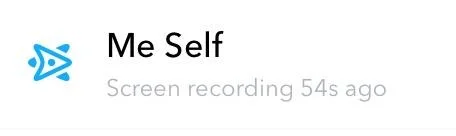
For chat conversations, Snapchat works the same way. If you record a chat, the app sends a clear message saying “___ SCREEN RECORDED THE CHAT” This appears directly in the chat window.

How to Screen Record Snapchat Without Them Knowing
Use Airplane Mode
A common trick people try to avoid sending notifications on Snapchat is to switch to airplane mode before taking a screenshot or recording.
- Open Snapchat and wait for the content to load completely. Keep the Snap or Story ready but don’t view it yet.
- Next, open the notification panel on your device and enable Airplane Mode. This will stop all internet connections, including WiFi and mobile data.
- Now you can safely open and record the content. Use your phone’s built-in screen recorder to capture what you need.
- After recording, completely close Snapchat. Don’t just minimize it – remove it from your recent apps list. Only then should you turn off Airplane Mode and reconnect to the internet.
Note: This method might not work every time. Snapchat’s system can sometimes detect the recording when you reconnect to the internet, even if you followed all the steps correctly.
Use a Second Device to Record
Another way to save Snapchat content without alerting the other person is by using a second device to record the screen.
- Open the Snap or Story you want to save on your main device.
- Use a second phone or camera to record the screen while you view the content.
This method works because Snapchat can’t detect when you record with a separate device. However, it may be a bit inconvenient since it requires another device and careful positioning.
Use Third-Party Screen Recording Apps
Some third-party apps like AZ Screen Recorder allow you to record Snapchat Snaps and Stories without sending a notification to the other person.
While this may seem convenient, many of these apps come with security risks and could violate Snapchat’s terms of service. Using them may put your account or data at risk, so it’s important to proceed with caution.
- ALSO READ: – How to See Who Screenshotted Your Snapchat Story
Frequently Asked Questions (FAQs)
Does Snapchat detect screen recording?
Yes, Snapchat does detect screen recording. If you take a screenshot or record, the app will immediately notify the other user once the recording is finished.
Can I screen record Snapchat without being detected?
No, Snapchat typically detects when someone is screen recording and sends a notification to the sender. While some third-party apps or methods claim to bypass this detection, using them could violate Snapchat’s terms of service and might result in your account being suspended.
Can I use third-party apps to record screens on Snapchat?
Yes, you can use third-party apps to record screens on Snapchat, but not all of them allow you to capture stories and chats from unknown users.