Annoyed by Instagram notes? Don’t fret! Our easy-to-understand tips will show you how to mute Instagram notes in no time.
Instagram recently introduced a new feature called “Instagram Notes,” similar to Twitter‘s Notes. Some users find the Notes amusing, while others don’t appreciate it and want to remove it. If you’re in the latter group, we’ve got two easy methods to mute Instagram Notes and keep them from bothering you on the app.
We’ll clarify what Instagram Notes are and guide you on muting them if you’d rather not have them cluttering your experience.
What Do Instagram Notes Mean
Instagram’s “notes” feature lets you post brief messages of up to 60 characters for your close friends or followers, and they can respond through DMs. These notes stay at the top of the Chats list for 24 hours before disappearing. Alongside thoughts, you can also add music or location as notes.
If some notes become bothersome, Instagram provides an option to mute them. In this article, we’ll guide you through a few simple steps to mute notes from a specific user.
How to Mute Notes on Instagram
Through Direct Option
Here’s a step-by-step guide on how to manually mute a person’s notes in your Instagram inbox feed permanently:
- Open the Instagram app (Android/iOS) on your device
- Now, swipe right to access the message box.

- This will list all the conversations and notes added by people you follow.

- Press and hold the note from the person you want to mute. This action will present you with three options: Report, Mute notes, and View profile.
- Choose “Mute Notes” from the pop-up.

- Confirm the action by tapping “Mute Notes” again to complete the process. If you change your mind, you can choose to tap “Cancel.”


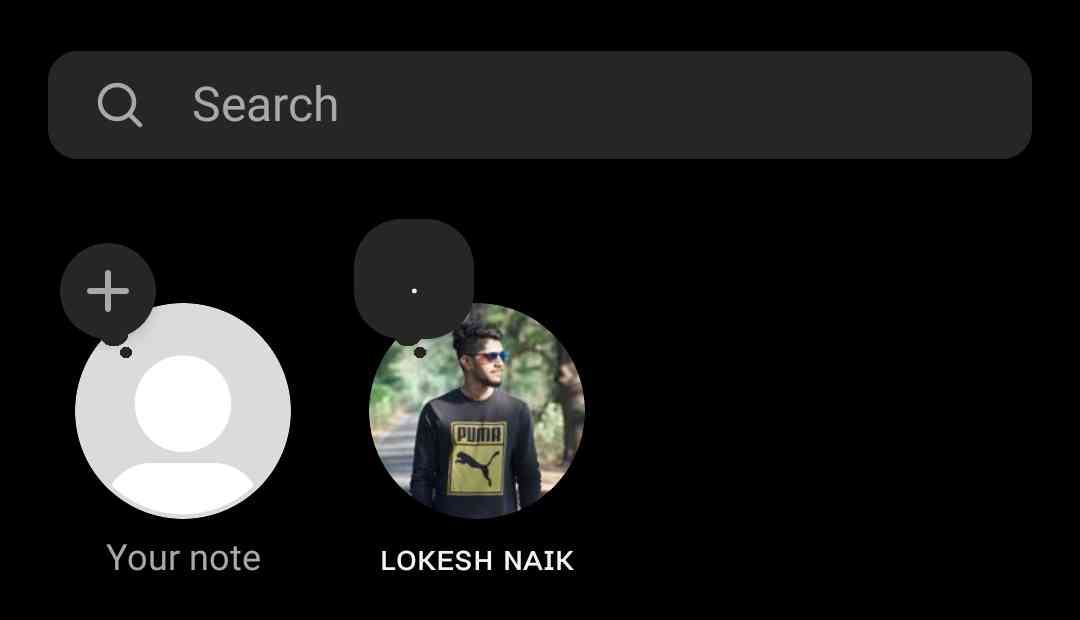
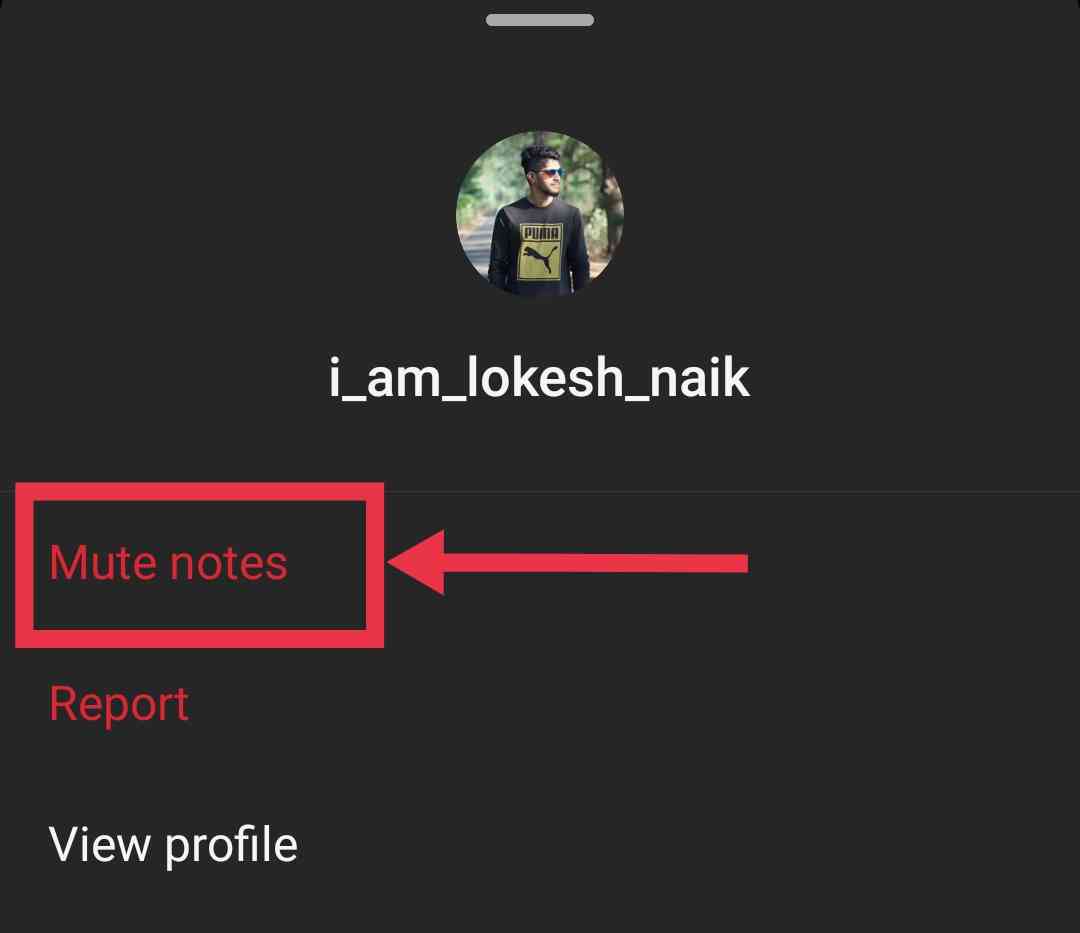

These steps will ensure that you no longer see notes from that particular person in your inbox feed.
Successfully muted someone’s notes and don’t know how to undo it? Check out our easy guide to unmute Instagram notes.
From Profile
You can permanently mute notes using the Instagram profile. Please note that this method is effective for the accounts you follow:
- Open Instagram app
- Go to the Instagram profile of the person you want to mute.
- Tap on the “Following” option.
- You’ll see various choices like Add to Close Friends list, Add to favorites, Mute, Restrict, and Unfollow. Select “Mute.”

- A menu will appear with three options: posts, stories, and notes. Enable the “Notes” option to hide all future notes posted by that person.

- That’s it!


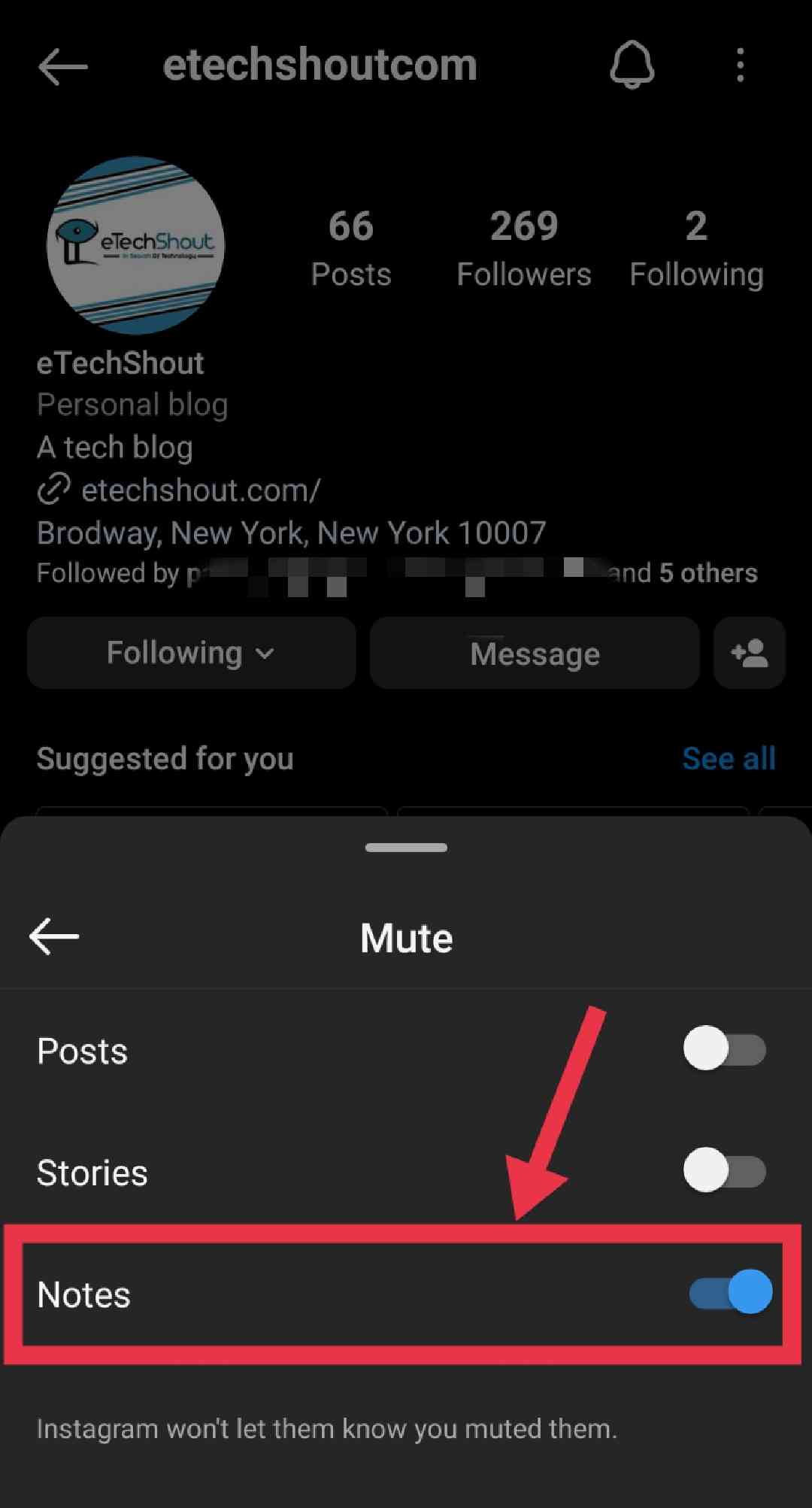
Unfortunately, there’s no direct method to mute the notes of all users, but you can use a workaround to mute them for specific users who are bothering you with their notes.
Although completely muting Instagram Notes of all the users isn’t possible, you can mute them one by one using the mentioned methods. If you strongly dislike Notes, you can use these methods to remove Instagram notes option.
If you found this guide useful, please show your appreciation by sharing it.
Looking to hide Instagram notes from specific users? Learn how to achieve this and more in our comprehensive guide
Frequently Asked Questions (FAQs)
What happens if I mute notes on Instagram?
When you mute notes from a specific person on Instagram, any notes they post will no longer be visible to you in your message box.
How to see muted notes on Instagram?
To view muted notes, visit the profile of the person, tap on the “Following” button, select the “Mute” option, and disable the “Notes” toggle. This will display their recent notes above your message box.
Can I mute music notes on Instagram?
Yes. By muting the notes, you don’t see any music notes added by that user.
Does restricting someone on Instagram stop them from seeing your notes?
No. Restricting someone on Instagram doesn’t prevent them from seeing your notes. Even if you restrict an individual, your notes will still be visible to them.
Why can’t I see people’s notes on Instagram?
You can’t see someone’s Instagram notes if they don’t follow you, blocked you, or made notes visible only to their Close Friends list.
Who can see the notes you leave on Instagram?
The notes you leave on Instagram are visible to you and the people who follow you on the platform (people you follow back). If you choose to make them visible only to your Close Friends, then only those specific individuals will be able to see your notes.