There was a time when Telegram was seen as just another messaging app. That is clearly not the case anymore. Every few months, the platform seems to roll out a feature that gets people talking. While most chat apps focus on basic messaging, Telegram keeps expanding with channels, bots, large communities, file sharing, privacy tools, and a long list of extras. That constant stream of updates is one reason people continue using it alongside apps like WhatsApp.
If you’ve landed here, there is a good chance Telegram is showing the “This user doesn’t seem to exist” error when you try to open someone’s profile.
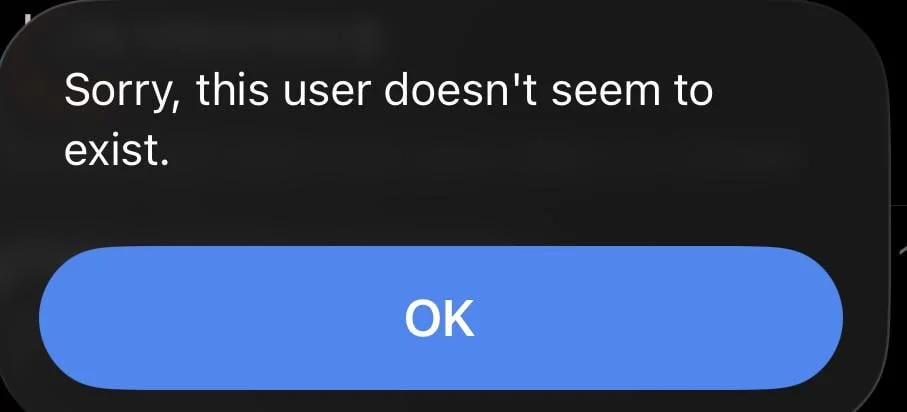
The strange part is that the account was visible before. Maybe you chatted with the person recently. Maybe you opened their profile a few days ago. Some users even receive messages from a person, only to find that the profile becomes inaccessible later.
The error can appear in different situations. For some people, the username no longer appears in search. Others see the message when opening an old conversation or tapping a profile link. There are also cases where Telegram refuses to add a contact even though the person clearly has an active account.
Because this can happen for different reasons, finding the actual cause is not always straightforward. Below, you’ll find the most common reasons behind this Telegram error and the fixes that have worked for other users.
6 Ways to Fix Telegram “This user doesn’t seem to exist”
Search Using Their Phone Number
If the person does not have a Telegram username, try finding them through their phone number instead.
Save their phone number in your phone’s contacts and make sure it includes the correct country code. After that, open Telegram and allow it to sync your contacts. Once the sync is complete, check your Telegram contacts list or use the search bar to look for the person.
If the number is linked to an active Telegram account, Telegram should recognize it automatically and display the person’s profile. You can then open the profile and start a conversation as usual.
Open Their Profile Through a Forwarded Message
If searching is not helping, there is another way to reach the person’s profile. Ask someone who can still access that Telegram account to forward you a message from that person. Once the message arrives, open it and tap on the sender’s name or profile picture.
In quite a few cases, Telegram is able to open the profile directly from a forwarded message, even when the account does not appear in search results. If the profile opens successfully, you can check whether the account is still active and try contacting the person from there.
Check if the Person Has Deleted Their Telegram Account
The person you are trying to contact may have deleted or deactivated their Telegram account. When someone removes their account, Telegram can no longer display the profile the way it normally would. As a result, you may see messages such as “This user doesn’t seem to exist” when opening old chats, profile links, or forwarded messages.
If you know the person outside Telegram, try reaching out through another platform and asking if they still use the same Telegram account.
The Account May Have Been Banned by Telegram
Over the past few years, Telegram has become much stricter about enforcing its rules. Accounts reported by multiple users or found to be violating Telegram’s terms can face restrictions or even permanent bans. This can happen for various reasons, including spam activity, sharing copyrighted or pirated content, sending large numbers of unwanted messages, or repeatedly posting content that goes against Telegram’s policies.
When an account is banned, it will disappear from search results, and people trying to open the profile link/old chats can end up seeing messages like “This user doesn’t seem to exist.”
Ask the Person to Check Their Phone Number Privacy Settings
Telegram includes a privacy setting that controls who can find an account using a phone number. Because of this, a person may have an active Telegram account, but you still might not be able to locate them through their number.
Ask your friend to open Telegram > Settings > Privacy and Security > Phone Number and check the “Who can find me by my number” option. If it is set to My Contacts, only people already saved in their contacts may be able to find and message them through their phone number. Switching it to Everybody makes the account discoverable through saved contacts.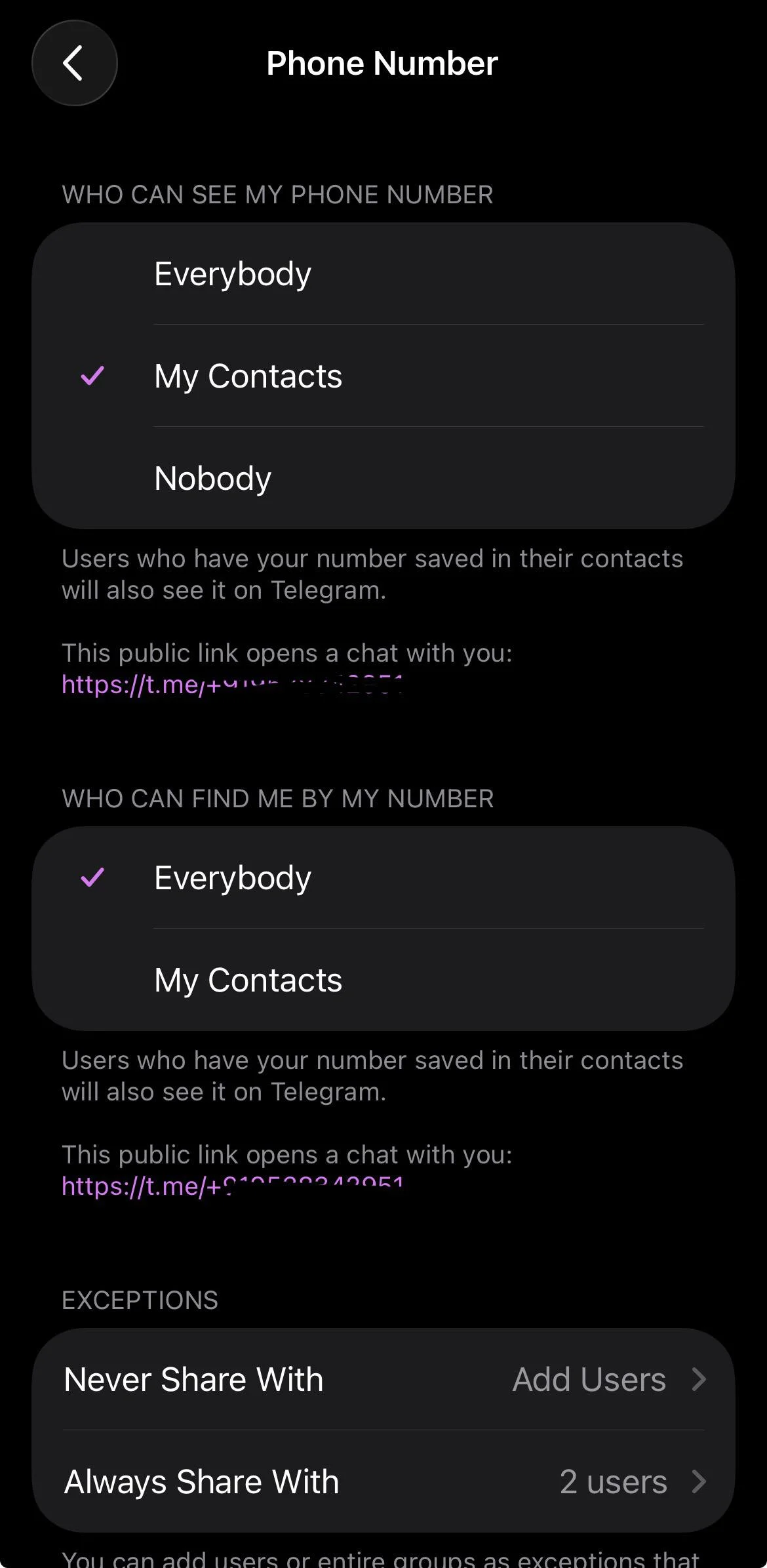
While they are there, it is also worth checking the “Who can see my phone number” setting. Choosing “Everybody” or “My Contacts” is usually a good idea. If it is set to “Nobody”, it can make it harder for other users to identify the account in certain situations.
There is Also a Chance They Blocked You
If you were able to view the person’s profile before and everything suddenly disappeared, a block could be part of the story. Telegram does not send a notification when someone blocks you, so there is usually no direct way to know for sure.
Depending on the situation, their profile may stop appearing the way it used to, messages may no longer go through, and you may find it difficult to contact them through normal methods.
Hope this guide helped you fix the “This user doesn’t seem to exist” error on Telegram. If one of these methods worked for you, feel free to let others know. And if you found a different fix that is not mentioned here, do share it in the comments. It might help someone else facing the same problem.