Telegram has changed the way people use messaging apps. The platform brought plenty of fresh ideas to the messaging space, and many of these features later appeared on other apps too, helping Telegram build its name as a trend setter in the world of online communication.
Telegram also has a few features that can be unexpected for users. One of them is the SMS fee that appears in certain countries when creating an account or signing in. Instead of sending the usual verification code, Telegram may ask for a small payment before delivering the SMS. A growing number of users have reported seeing this charge when trying to access Telegram on a new phone or create an account.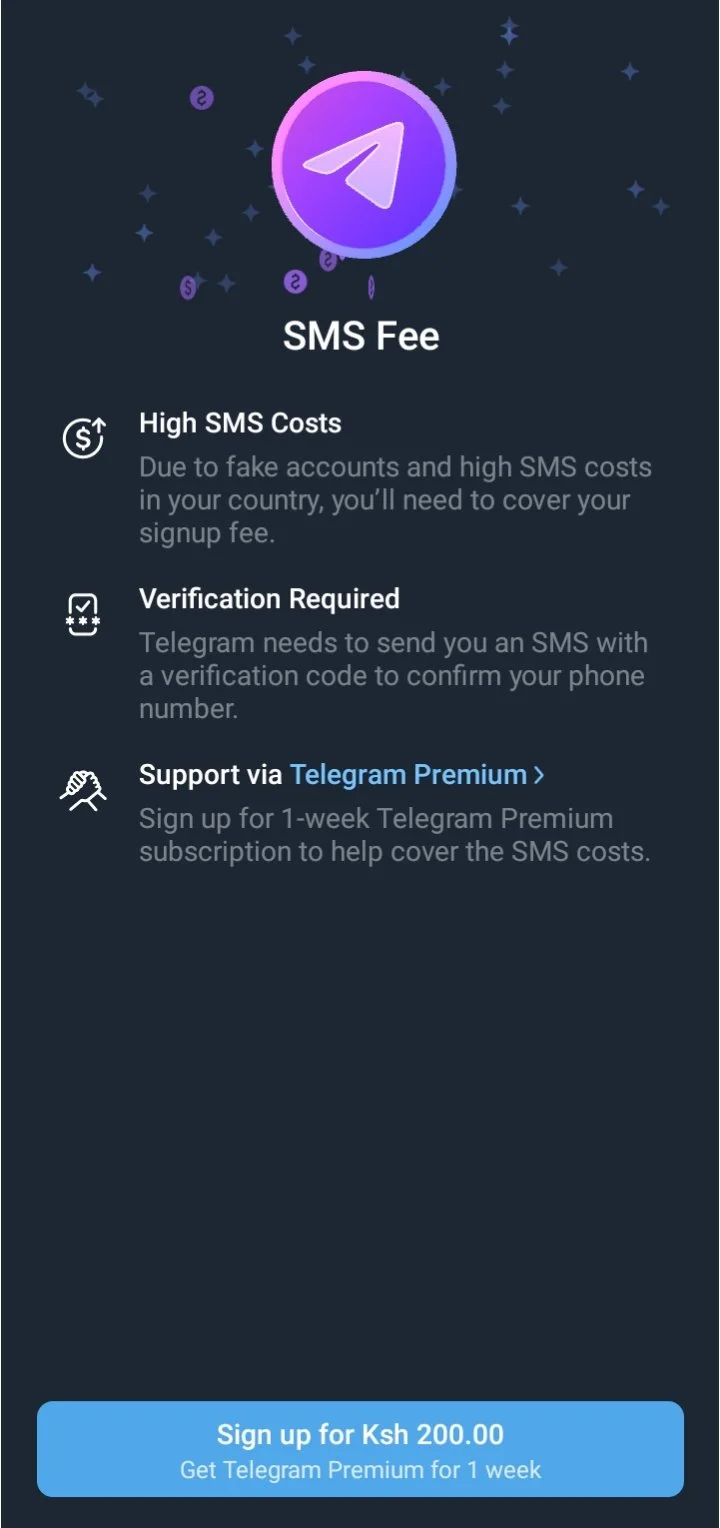
The fee is linked to the cost of sending SMS messages in certain regions, according to Telegram. Still, paying just to receive an OTP is not something everyone wants to do, so users have been looking for ways to skip, bypass, or avoid the charge during login. If you are seeing the same payment screen, there are a few methods you can try before paying the SMS fee.
How to Fix Telegram SMS Fee and Verify Your Number Without Paying
Use an Older Telegram Version on Android
Here is a trick Android users can try to skip SMS fee in Telegram. The idea is pretty simple. Instead of signing up through the latest Telegram app, use an older version first. Some users have found that older releases, including version 1.09 or 1.14, may let them complete the registration without showing the SMS fee.
- To try it, first uninstall/delete the current Telegram app from your phone.
- Next, download a trusted older version of Telegram and install it on your Android device.
- Open the older version, enter your phone number, and go through the sign up process.
- Once the account has been created, you can head over to the Google Play Store and update Telegram to the latest release.
Use Telegram X for Verification
If the regular Telegram app is asking you to pay for the SMS, there is another route you can try. Install Telegram X on your Android phone and use it to sign in with your number. In some cases, Telegram X can send the verification SMS without showing the same fee.
Once you are signed in to Telegram X, open the regular Telegram app and enter your phone number again. This time, Telegram can send the login code to your existing Telegram X session instead of sending another SMS. Enter that code in the regular app and finish the login.
After you have signed in to the regular Telegram app, you no longer need Telegram X. You can simply remove it from your phone.
Use Nicegram or iMe
If you have already tried the usual Telegram app and it is still asking you to pay for the SMS, Nicegram or iMe can be worth a try. Both are alternative Telegram clients, and you can sign in to your Telegram account through them just as you normally would.
Once you are logged in to any of the above app, leave the app open and switch to the original Telegram app. Now, enter your phone number there and continue with the login. Even if the main Telegram app asks for a verification code, you may receive that code inside your active Nicegram or iMe session instead of through another SMS. Open the alternative app, copy the code, and enter it in the original Telegram app.
That should let you complete the login on the official Telegram app without paying for another SMS. After everything is working, there is no need to keep Nicegram or iMe installed. You can remove the alternative app and continue using Telegram as usual.
Check Another Logged In Device
If Telegram is already open on another device, use that session to receive the login code. Telegram can send the code directly to an existing session instead of sending another SMS to your number.
Keep Telegram open on the old phone, tablet, or computer. On the new device, enter your phone number and continue with the login. When Telegram asks for the code, switch to the device where your account is already logged in. Open the Telegram message containing the login code, then enter that code on the new device. After the code is accepted, your account will be ready on the new device.
Try Signing Up With Mobile Data
When the payment screen appears, close Telegram completely. Once Telegram is closed, clear it from your recent apps. Make sure the SIM you plan to use has an active data bundle, then turn WiFi off and leave Mobile Data on.
Now, open Telegram again and try signing up with the same number. In some cases, the verification screen may appear differently when Telegram detects the mobile network instead of a WiFi connection. If it still shows the SMS fee, you can simply try one of the other methods listed below.
Sign In with Email
If your Telegram account is linked to your Google account, you may have another way to complete the login without relying on the SMS OTP. Instead of waiting for a paid verification message, look for the Sign in with Google option when Telegram gives you the choice.
Tap the Google sign in option and select the account connected to your Telegram account. Follow the prompts shown on screen and complete the verification. If the option is available for your account, this can save you from having to receive the verification code through SMS.
Try a VPN
A VPN is another method some users have reported trying when the Telegram SMS fee appears.
Close Telegram completely by closing it from app switcher/recent apps and connect to a VPN server in another country. After the VPN connection is active, open Telegram again and try the sign up or login process with your phone number.
If the verification screen changes and Telegram lets you continue without the SMS charge, finish the login as usual. If the same fee still appears, disconnect the VPN and try another method instead.
RELATED GUIDES:
- How to Fix Telegram “This phone number is banned” Error [Trick to Unban]
- How to Fix Telegram Keeps Logging Me Out
If you managed to bypass the Telegram SMS fee using any of the methods above, there is one more step worth doing after you are logged in. Set up a passkey on a device where your Telegram account is already active. A passkey can let you use your fingerprint or device security for future logins, so you may not have to depend on an SMS code every time you sign in. Setting it up in advance can save you from dealing with the same SMS fee later.
Also, if one of the methods above worked for you, let us know which one did the job. If one of the methods above worked for you, tell us which one you used in the comments. Found another way to bypass the Telegram SMS fee? Share that too. Your tip may save other Telegram users from paying for the verification SMS.