Among Us has become a favorite game for many players for its fun gameplay, teamwork, and the thrill of figuring out who the imposter is.
Your in-game name is a small detail, but it matters a lot. It is how other players know you, and it adds your own style to the game. After a while, using the same name can feel dull. Many players like to try new names that sound funny, cool, or unique so they stand out in the lobby.
In the past, changing your name in Among Us was not very clear for everyone. Many players did not know where to do it or how it worked. Now it is much easier, and you can change your Among Us name without much effort. In the next part, you will see how to do it step by step.
How to Change Name in Among Us
- Open the game and wait for the main screen.
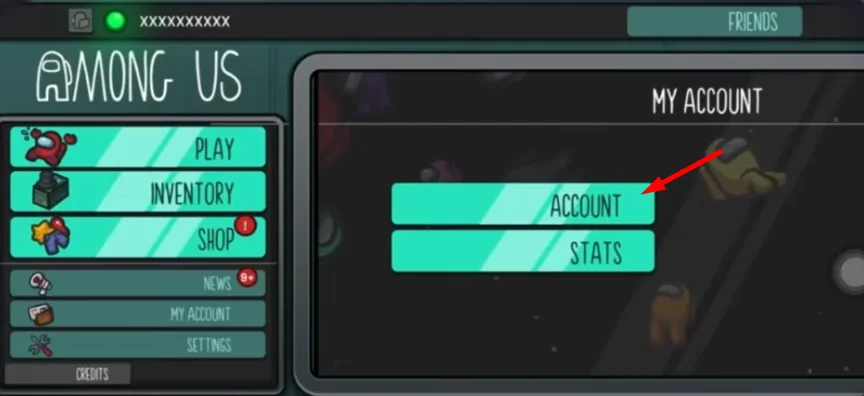
- Click on Account at the top left of the screen.

- Log in to your account, or create a new one if you don’t have it yet.
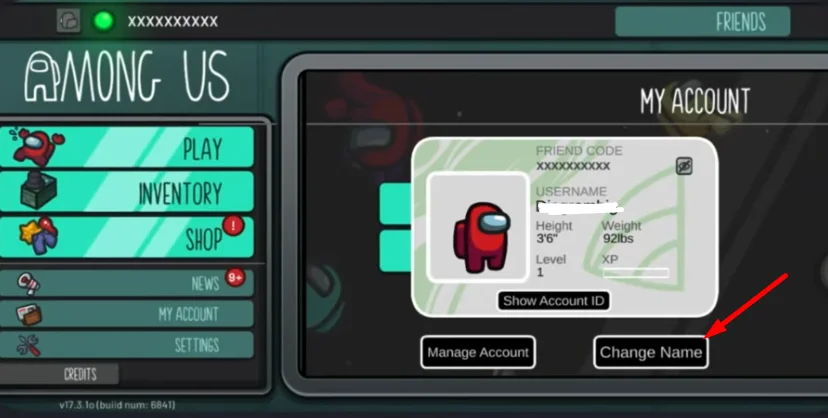
- Once inside, go to your account settings.
- Click on Change Name.

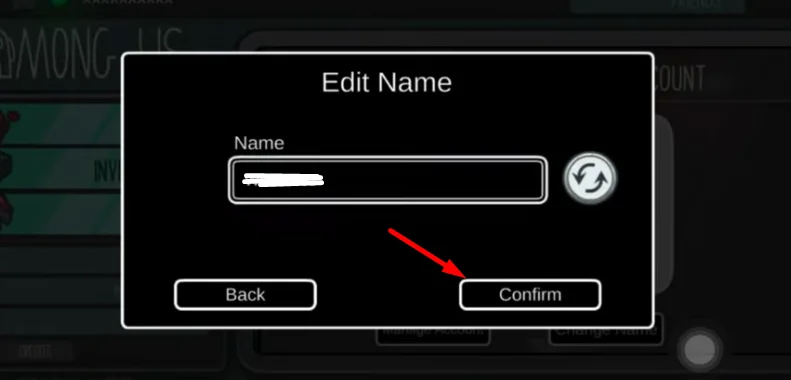
- Enter the name you want to use, or tap the refresh icon for a random name.
- Click on Confirm to save your new name.

- Your updated name will now appear in the game.
Why Can’t I Change My Name in Among Us?
If you do not see a sign in option near the random name button, it usually means your account is not fully active yet. You need to sign in before you can use your own name.
One reason could be the age you entered. If it is set to 12 or below, the game puts limits on your account. In that case, you cannot change your name or use free chat.
Another reason could be a failed identity check on your phone, like Face ID or Touch ID not going through. Closing the game and opening it again can help. Also, make sure your internet is working, since signing in needs a connection.
Also, take a look at the small dot on the top left of the screen. If it is pink, you are using a temporary account. When it turns green, it means you are fully signed in and can change your name.
There are times when the email you used has an issue, which stops the sign in process. If everything looks fine and it still does not work, you can try installing the game again.
Can You Change Your Name As A Guest In Among Us?
If you are playing as a guest, you will not be able to set your own name. The game only gives you the option to use a random name by using the Randomize option.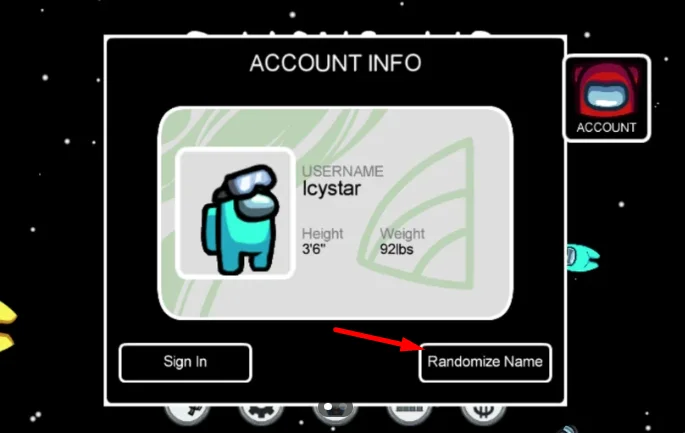
This can feel a bit limiting if you already have a name in mind. But that is how guest mode works in Among Us. It is mainly there for quick access without setting up an account.
If you want full control over your name, the best option is to create an account and sign in. That way, you can choose any name you like and use it every time you play.