TikTok has seen a huge rise in popularity over the years, even facing bans in several countries at different times. Despite that, its fan base and user base continue to grow rapidly. Millions of people still use the platform daily to create, watch, and share content. However, with such a large user base, users often run into unexpected issues and errors.
We have already shared many guides on TikTok problems and how to fix them. Today, here comes another one that many users are talking about. A message that says “Setting restricted by TikTok to protect your privacy” has started appearing for some people. Because of this, features like sending messages, duets, or stitches may stop working without any clear reason.
Many users say they cannot change certain settings, and some options are missing or locked. In the sections below, you will find simple ways to understand this issue and fix it.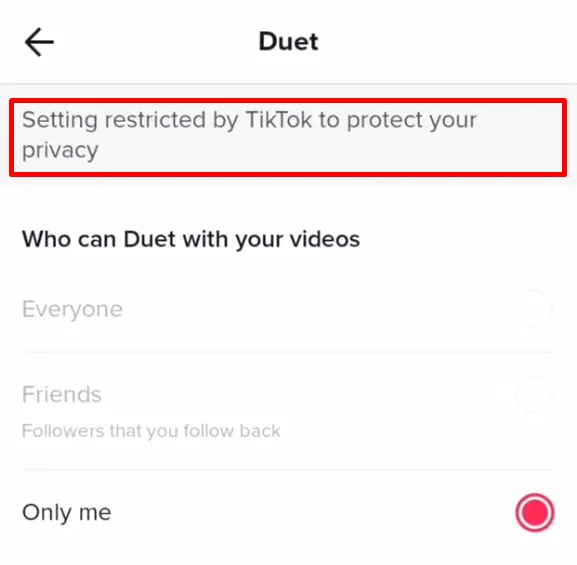
What Does “Setting restricted by TikTok to protect your privacy” Mean
This error message on TikTok simply means your account is seen as under 16 years old. If your age is below 16, TikTok limits a few features on your account. This includes things like turning on duets and stitches. So even if you look for the option, you will not be able to change it.
Back in January 2021, TikTok made changes to make the platform safer for younger users. Accounts of users aged 13 to 15 are set to private by default. Along with that, a few privacy controls are locked to protect them.
TikTok also teamed up with Common Sense Networks to create content that is safe and suitable for younger audiences. Because of these rules, if you see this message, it means those features are turned off for your account due to your age.
How to Fix “Setting restricted by TikTok to protect your privacy” Error
Request TikTok to Change Your Age
If you want to remove this restriction, the only way is to update your age to 16 or above. Sadly, TikTok will not let you change your birthday with a simple tap. If your age is showing under 16, you have to reach out to their support and ask them to update it.
- Open the TikTok app and go to your profile page.
- Go to Settings and privacy.

- Tap on Report a Problem.
- Choose Account and Profile.
- Then tap on Editing Profile.
- Select Other and tap on Need More Help.

You will now see a place where you can type your message. Write a short request asking TikTok to update your date of birth and then submit it.
Important Note: A valid ID proof is required if you want your age to be changed. TikTok will ask you to confirm your identity, so make sure you have your ID ready before you send the request. Without it, your age will not be updated.
Send a Request Using the TikTok Feedback Form
If you have already tried contacting support from the app and did not hear back, there is another way you can try. You can send your request through TikTok’s feedback form.
- First, open the feedback form using this link: https://www.tiktok.com/legal/report/feedback
- Once the page opens, fill in your basic details like your email address and your TikTok username so they know which account you are talking about.
- Next, choose Change account information as the topic.
- After that, pick Other as the subtopic.
- Now comes the main part. In the message box, clearly explain that you entered your age incorrectly and mention your real age. For example, you can say your account shows under 16, but you are actually 18. Before you submit the form, attach a clear photo of your ID. TikTok uses this to confirm your details.
After sending the form, you will need to wait a few days for a reply. If everything checks out, TikTok will update your age, and you won’t see that error message again.
Create a New TikTok Account
If you are still seeing this error on your main account, then sadly, the first two methods are the only real ways to fix it. TikTok does not give many options when it comes to age-related restrictions.
But if nothing is working for you, or if your current account is not that important, or maybe you are new to TikTok and planning to grow from scratch, then creating a new account can be a good option.
While signing up, make sure you enter your age as 16 or above. It is a good idea to set it as 18 so you have full access to all features and settings.
- Open TikTok and go to your profile.
- Tap on your username at the top.
- Select Add account.
- Then choose Use phone or email.
- On the sign-up screen, enter your birthday carefully. Make sure it shows that you are at least 18 years old.
- After that, tap Next and follow the steps shown on your screen to finish setting up your account.
Once your new account is ready with the correct age, you will be able to access all privacy settings. You can turn on options like duets and stitches without seeing that restriction message.
RELATED:
- How to Fix “Due to multiple Community Guideline violations” TikTok Error
- How to Fix Content Under Review on TikTok [Android/iOS]
TikTok asks for your birthday when you create an account, and it uses that to decide what features you can use. If you set your age to below 16, TikTok limits a few privacy settings. It keeps your account private by default and turns off options like suggesting your account to others.
TikTok made these rules to protect younger users. Because of this, you cannot change certain settings until your account shows that you are at least 16.
If you want to avoid these limits, you can create a new account with the correct age set to 16 or above. Or, if you are close to turning 16, you can just wait. Once your age updates, features like duets and stitches will be available.
If your age is already correct, but you still cannot change these settings, you can try the methods shared above. I hope this guide cleared your doubts and helped you fix the issue. Feel free to share this and let me know which method worked for you or if you found another way.