Facebook Messenger is a simple way for most of us to stay in touch every day. From quick chats to long talks that go on for years, it holds a lot of memories in one place. Over time, people have seen different errors here and there, and now there is a new one that many are talking about.
Lately, a message saying “This chat is no longer active. Messenger upgraded security. Use your end-to-end encrypted chat to message” has started showing up for some users. Out of nowhere, an old chat just stops working. You can still open it and read everything from before, but you cannot send messages, react, or do anything in that chat. Instead, it asks you to continue in a new encrypted chat with the same person.
This has made many people worried. Some found their personal chats locked when they woke up, including conversations with partners, close friends, or even chats they wanted to keep safe forever. It feels like those chats have turned into a read-only space, and naturally, people want to know what is happening and what they can do next.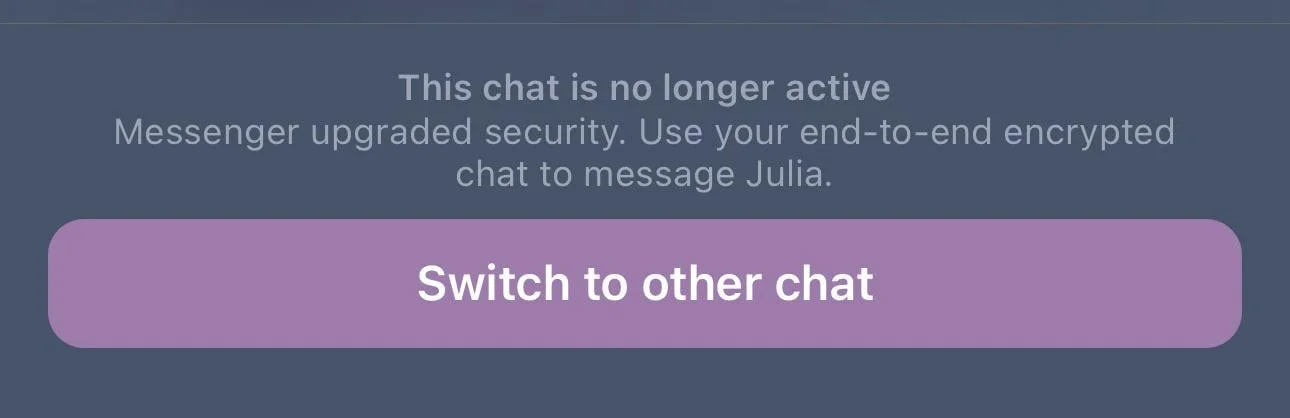
How to Fix “This chat is no longer active” on Facebook Messenger
Remove the Encrypted Chat So Your Original Chat Stays Active
This issue usually shows up when you have two one-to-one chats with the same person on Facebook Messenger. One of those chats is protected with end-to-end encryption, and that one is set to become the main active chat. The other chat does not disappear, but it moves to your Archive and becomes read-only. You can still open and read it anytime, but you cannot send messages in it.
If you would rather keep your old chat active instead, there is one simple option. You need to remove the encrypted chat from your inbox. After you do that, your original chat will switch to end-to-end encryption and become your only active conversation with that person. Keep in mind, this change may not show instantly, so give it a little time.
- Open your Messenger app on your phone.
- Tap on the search bar at the top and type the name of the person you have two chats with.
- Look for the chat that has a “Secret conversation” label and open it.
- Tap on the name at the top of the chat to open chat details.
- Check that it shows end-to-end encrypted under their name.
- Scroll down and tap on Delete chat.
- Confirm by tapping Delete again.
Check archived Chats or Download Your Message Data
Open Facebook Messenger and head to your archived chats. When this issue shows up, the older conversation is often moved there. You can search for the chat and read all past messages, even though sending new messages in that thread is not allowed.
Another option is to request a copy of your data using Meta’s “Download Your Information” feature. This gives you a file with your message history, including older chats. It will not bring the conversation back into your inbox, but you will still have access to everything saved in that file.
If your chats are using end-to-end encryption, you can also turn on Message Storage in the Privacy and Safety settings. You can connect it to Google Drive, iCloud Keychain, or set up a PIN or one-time code. This helps keep your chat history synced and available across devices.
If a chat has been fully deleted, it will not show up again inside the app. In that case, your downloaded data may still include those messages.
Right now, the main issue seems to come from how Meta has shifted older secret conversations into end-to-end encrypted chats. Because of this change, even if you remove the new chat, your original conversation may still stay locked. On top of that, many people are unable to find the old “Secret conversation” label anymore, which makes it harder to even understand what changed. For users who had years of personal messages saved, this has been tough to deal with, since those chats now feel out of reach, and there is no clear way to bring them back into normal use.
I hope this article helped you understand what is going on and what you can try. If you found it useful, do share it with others who might be facing the same issue.