Recently, I bought a Redmi Fire TV. Everything was going smoothly until I tried playing a video file stored on my phone. My first instinct was to cast it to the TV, but when screencasting didn’t work, I decided to send the video file directly to the TV instead.
Since Fire TV OS is different from Android TV, I quickly realized that my go-to app, Send Files to TV, wasn’t available. After some searching, I discovered an alternative called LocalSend. It had great reviews and a simple, user-friendly interface, so I installed it both on the TV and my phone. I tried sending a 1GB .MKV video file from my phone to TV, and after waiting nearly five minutes for the transfer to complete, I was ready to hit play — only to be met with a frustrating error:
“[GalException/NOT_SUPPORTED_FORMAT]: Unsupported file formats.“
![Screenshot showing the [GalException/NOT_SUPPORTED_FORMAT]: Unsupported file formats error on Local Send app](https://etechshout.com/wp-content/uploads/2025/07/local-send-unsupported-file-format-error-screenshot.webp)
It didn’t make sense. .MKV is a common video format, and seeing this error repeatedly after reattempting the transfer was incredibly annoying. However, after exploring the settings and making a few tweaks, I finally managed to fix the issue.
If you’ve run into the same error with the LocalSend app, this guide will walk you through what worked for me — and help you fix it easily.
Easiest Ways to Fix LocalSend App “Unsupported file formats” Error
Disable the “Save media to gallery” Option
The “Save media to gallery” option in LocalSend tries to place received media files directly into your TV’s gallery. Sometimes, this causes issues with certain file types that the system doesn’t recognize or support, showing the unsupported format error. Disabling this option allows the file to be saved without that gallery check, which often fixes the problem.
- Open the LocalSend app on your TV.
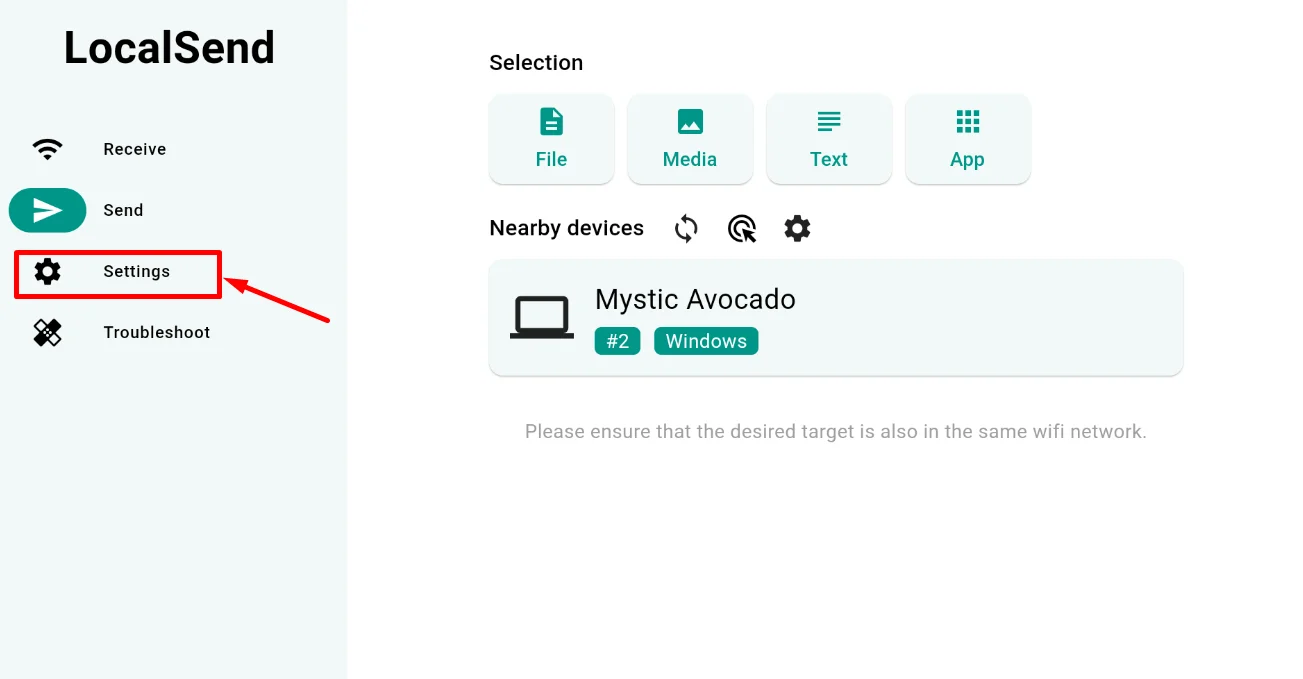
- Using your remote, press the down button and select the Settings option.

- In the Settings menu, scroll to the “Receive” section.
- Locate the “Save media to gallery” option — it will be checked by default. Uncheck this option to disable it.

- Now, go back to the main screen and resend the file from your phone.
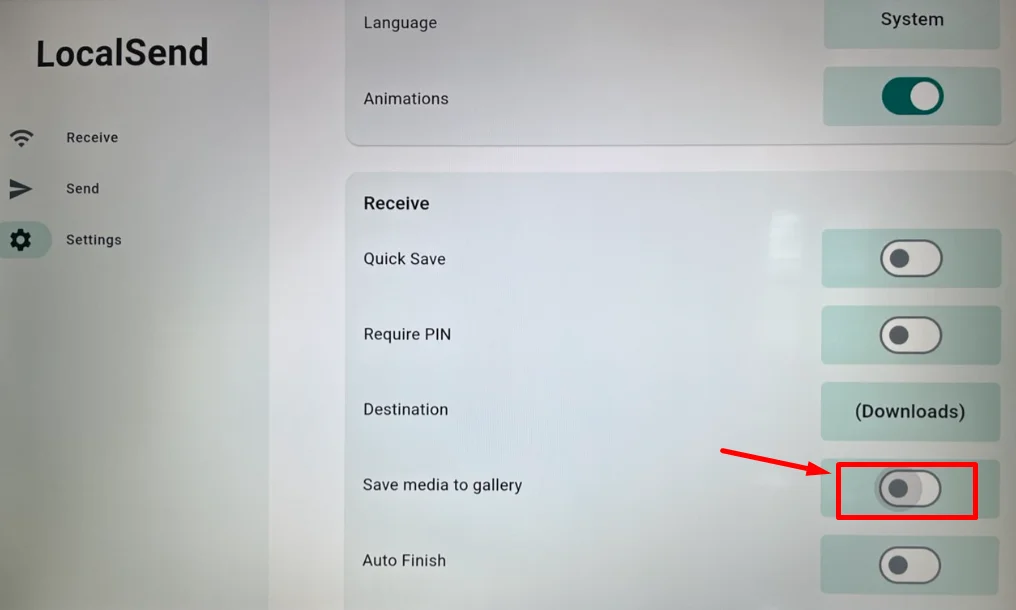
After making this change, the file should transfer and play without showing the “Unsupported file formats” error.
Rename the File Extension
If turning off the “Save media to gallery” option didn’t solve the problem, you can try a simple trick to get around the error. This method helps skip the format check that often causes the “Unsupported file formats” message in the LocalSend app.
- Open your phone’s file manager and find the file you want to send.
- Rename the file by removing the file extension from the end of the name.
For example:
video.mp4 → video
movie.mkv → movie
clip.mov → clip
- Once renamed, send the file again using the LocalSend app.
- After the file is transferred to your Fire TV, rename it back to its original format if needed, or open it using a media player like VLC that can detect and play common video files without the extension.
This method works because LocalSend sometimes blocks certain formats during the transfer. By removing the extension, the app doesn’t check the file type, and the transfer completes successfully.
These are the two easiest ways to bypass the [GalException/NOT_SUPPORTED_FORMAT]: Unsupported file formats error in the LocalSend app. If neither of these methods works for you, it’s a good idea to try a different file-sharing app that’s more reliable with your device.