This is an in-depth Pixelup app review, based on our experience testing the Pixelup AI enhancer app. This included editing old pictures and trying all the different tools as well as features.
While the app is easy to use, a lot of functionality is available. For this review, we also looked at its features, pricing, and app performance.
Pixelup App Review
Pixelup app is available as a mobile app for Android and iOS devices. Aside from its impressive functionality, it also offers tools to make your old, blurred, or black & white photo look better.
It is easy to use, and you can add some effects to pics with it. In addition, you can easily share your photos with others and save them to your mobile device. In this Pixelup app review, we explore its features in detail. Let’s dive right in.
What is Pixelup App?
Pixelup is a tool that uses artificial intelligence to enhance your photos. The Pixelup app allows you to take a selfie or upload an old photo and add enhancements to the picture to make it look better.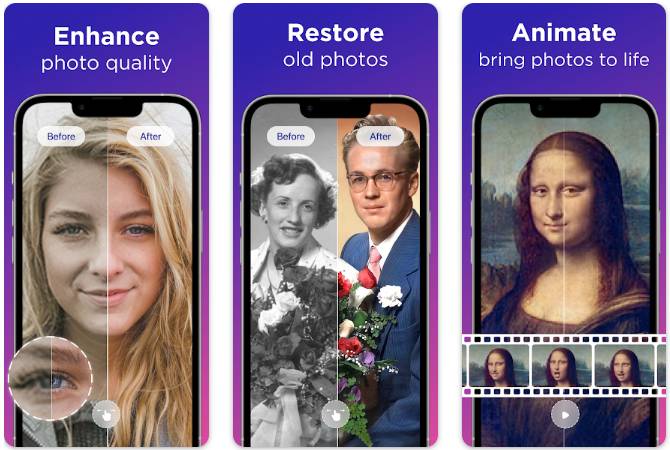
Pixelup Features
- Improve the quality of your photos
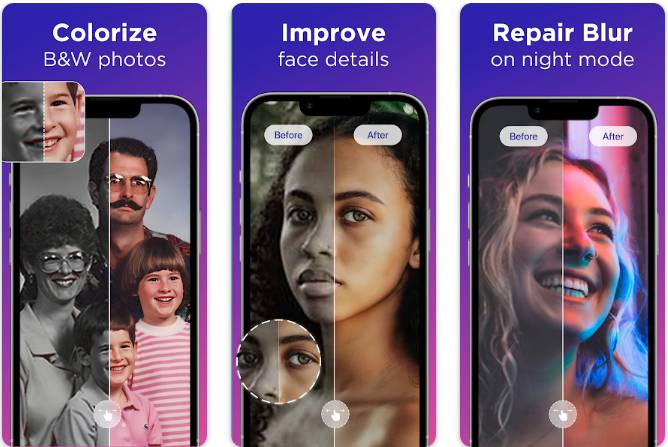
- An enhanced AI algorithm that makes faces look perfect and sharp
- Make black-and-white pictures colorful
- Create animated photos
- Transform old, blurry photos into high-resolution ones.
Pixelup App Cost
Pricing is an important aspect of this Pixelup app review. Is this AI enhancer more affordable than others? Well.
You can download the app for free from the Apple App Store and the Google Play Store, but additional features may require you to make in-app purchases.
The weekly subscription costs $2.41. The in-app purchase price starts from $2.99 and goes up to $29.99. There is also a Pixelup Premium Lifetime option for $39.99.
We discuss the performance and how to use the tutorial further down in this Pixelup app review.
How Does Pixelup App Work?
Pixelup is an app that comes with Artificial Intelligence (AI) to enhance the quality of your photos instantly. You can recolor and unblur old, blurry, distorted photos and revitalize them with crisp, clear images.
How to Use Pixelup App?
The app comes with an inbuilt option to add color to your old, black, and white old family photos to make them look new. All it takes is one click to add color to any photo.
You can animate old photos using the ‘Animate’ feature. You can enhance and colorize your photos, and then revive memories with the ‘Animate’ feature.
The app has tons of tools that can bring your photos to life with a face animator. Pixelup allows you to create a perfect photo or an animated video instantly.
Conclusion: Pixelup App Review
Pixelup app enhances faces pretty well, but it doesn’t enhance or sharpen other parts of the image. We tested it on some photos captured with an old camera, and the improvements the app made on the faces were impressive, though the rest of the body parts remained blurry.
It does not remember the last path used when opening photos from the phone. It is time-consuming to navigate to the folder where the picture is located. The free plan has an advertisement for enhancement and one ad for saving.
The free version works decently. But the app adds a big watermark at the bottom of the picture which is just annoying. You can do a lot with photos with this app. However, the app crashes constantly sometimes.
The animation on the app could be improved. The results of animation tend to have an awkward look and tend to separate the head from the face frequently.
It’s not easy to animate multiple faces as shown in the video descriptions. In some cases, black and white pictures don’t colorize correctly and produce reddish spots on the skin, particularly around the mouth and nose.
Despite colorizing old B&W photos, the quality does not meet expectations. There are too many ads in the app and they are too long.
Whenever you apply an effect, you’ve got to watch a 30-second advertisement, which means that if you are editing a photo by applying 6 available effects, you will have spent 3 minutes watching advertisements.
The price is also a downside. The subscription amount is not affordable for most people. It is pricey for the weekly version, but if you’ll use it frequently, you may want to purchase the lifetime version.
ALSO READ: –
- Top 20 Best Photo to Cartoon Picture Apps for Android and iOS in 2022
- 11 Best Photo Merge Apps For Combining Photos (Android & iOS)
- 11 Best Passport Photo Apps for Android and iPhone (2022)
Frequently Asked Questions (FAQs)
Is Pixelup app free?
The app is available for free in the Apple App Store and Google Play Store, although in-app purchases may be required to unlock additional features. Pixelup app price for in-app purchases starts from $2.99.
What are some Pixelup alternatives?
Some of the popular AI enhancer apps like Pixelup are PicPlus, Tingo, Animatify, and Gemini.
After learning about the Pixelup app’s features, how it works, pros and cons, it’s time for you to decide whether the Pixelup is right for you or not. If you’re looking for a premium AI enhancer tool and an old photo colorizer or to make old/blur photos look new, Pixelup is a great choice.
But if you are looking for a free AI-enhancing app and hate annoying ads every now and then Pixelup is not for you. The app offers decent results quickly but they are far from outstanding. We hope you found this Pixelup app review insightful. Share this article!