Instagram is one of the most popular social media apps today, used by people of all ages to share photos and videos, keep in touch with friends and family, and follow their favorite brands and celebrities. One useful feature Instagram offers is the ability to see who you recently followed. This can come in handy if you’re actively growing your network, looking to engage with new content, or just trying to curate your feed.
You can check all your recent or new followers with a few easy clicks within the app. But what if you want to check who another user has started following lately? In this article, we’ll walk through exactly how to view your own recently followed accounts as well as how to see who recently followed someone on Instagram.
How to See Who Someone Recently Followed on Instagram
In the past, Instagram offered a feature that allowed users to see who someone had recently followed, without the need for any third-party applications. This was possible because Instagram displayed a user’s followers list in chronological order, with the most recent followers appearing at the top and the earliest followers at the bottom.
Those who have been using Instagram for a long time may be familiar with this chronological arrangement. Whenever someone new followed your account, they would instantly appear at the very top of your followers list. The order of your followers was determined by the time at which each person clicked the “follow” button on your profile.
This chronological display made it easy to identify the accounts someone had started following recently. By simply looking at the top of their followers list, you could see which users they had added to their Instagram network lately.
However, from June 2021, Instagram has made some changes to the way follower lists are ordered. Users are no longer able to view their Instagram followers in chronological order. Additionally, if you check to see if another Instagram account has the same followers list as you, you may notice that the followers are displayed in a different order. This is because Instagram has changed the default follower list setting across all devices.
While the previous method of viewing recent followers chronologically may still work for now, it’s likely to change with future updates. In the meantime, there are alternative methods you can use to check your latest followers, which will be discussed below.
How to Check Your Recent Follows on Instagram (Without Third-Party Apps)
- Open the Instagram app on your device
- Log into your account if prompted.
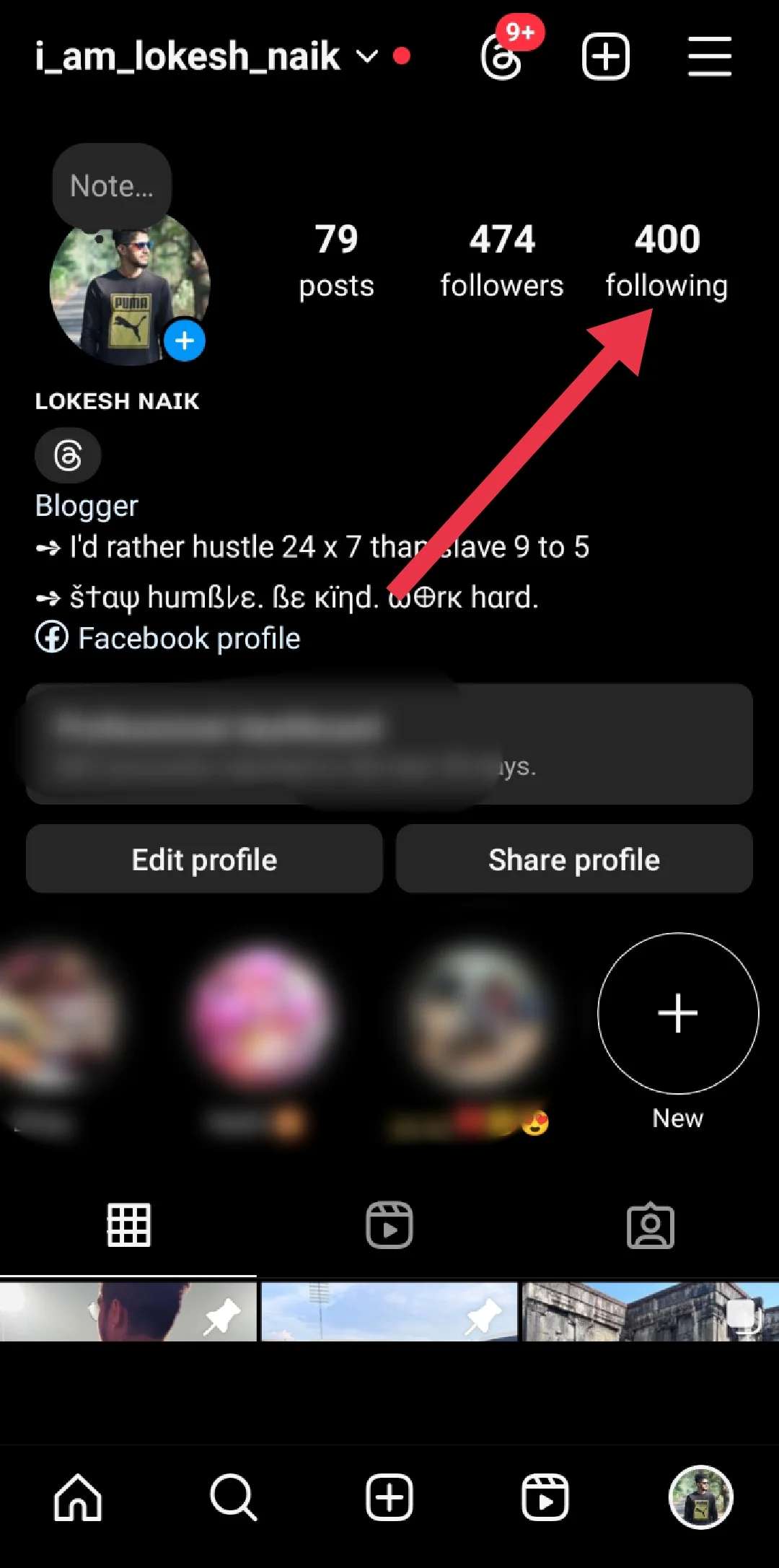
- Go to your profile page by tapping the circular profile picture icon in the bottom right corner of the screen.
- On your profile, locate the “Following” section, which displays the total number of accounts you are currently following. Tap on this “Following” number to open a list of all the profiles you follow.

- At the top of the Following list, tap the “Sort” button, which likely says “Default” to start.

- From the sorting options that appear, select “Date followed: Latest.” This will instantly rearrange
 your Following list to show the Instagram accounts you followed most recently at the very top.
 - Scroll through the top of this reorganized list to see the users you have followed in the past few days or weeks. The newest follows are listed first, in reverse chronological order.
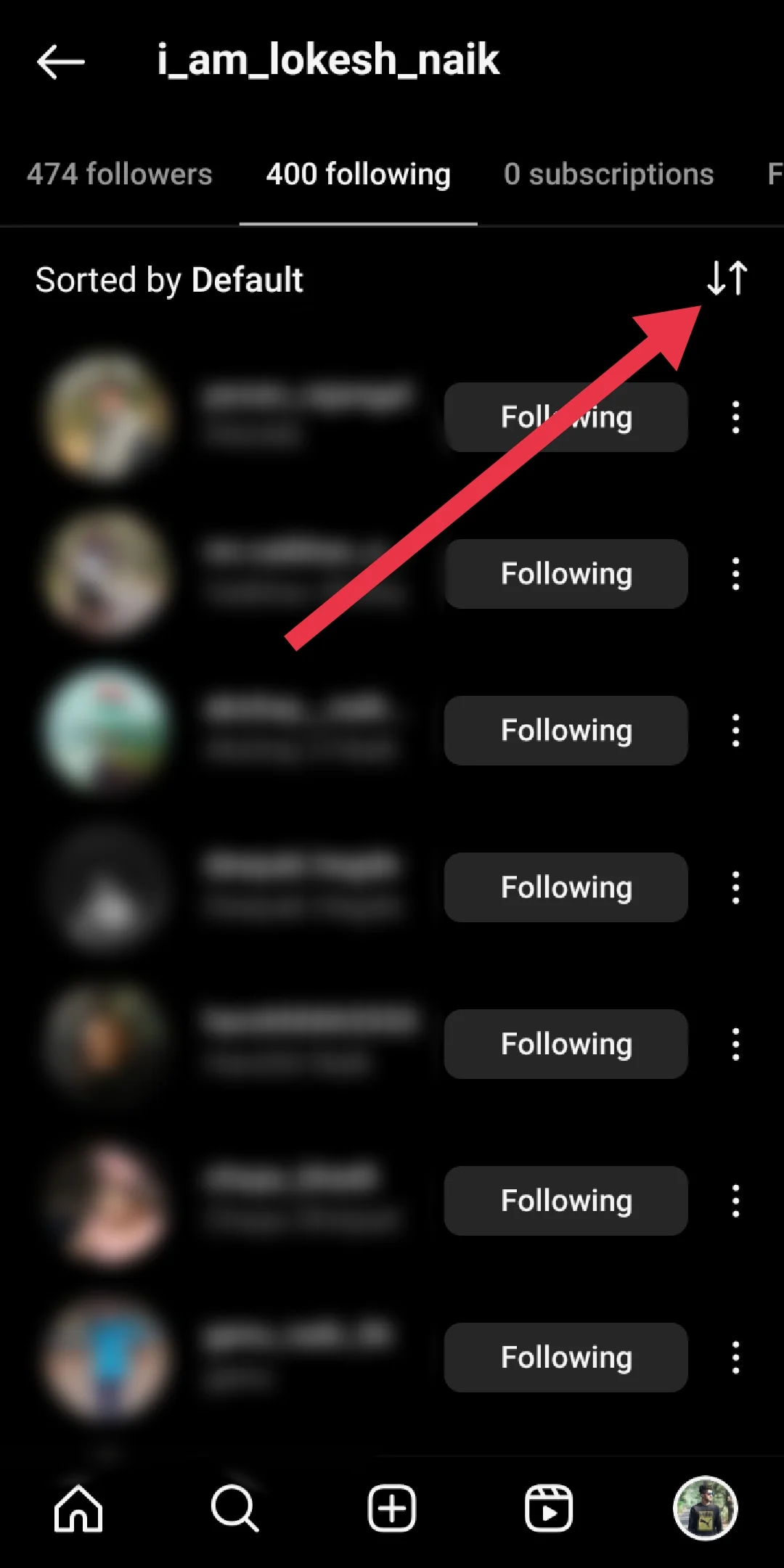
 your Following list to show the Instagram accounts you followed most recently at the very top.
ALSO READ:
Although Instagram has removed the option to view someone’s followers list in chronological order, with the most recent followers at the top and the earliest at the bottom, you can still check your own recent followers using the methods covered in this article. These techniques work directly within the Instagram app, without the need for any additional tools or third-party software.
I hope you found this guide helpful in learning how to see who you’ve recently followed on Instagram. Feel free to share this article with others who might also find it useful. If you know of any other methods for checking who someone has recently followed on Instagram, please let us know by leaving a comment below. We’d love to hear your ideas and experiences!