Facebook Marketplace is a built-in feature inside the Facebook app that allows people to buy and sell items without needing any extra app. Its a great option to find nearby deals, used products, or even post their own items for sale. Because everything is managed within Facebook, it is convenient for both casual buyers and regular sellers.
A lot of people face a situation where the Marketplace does not show all the listings. You might notice that only a few items appear, or certain posts seem to be missing when you search. This can ruin the whole experience because you expect to explore many choices, but end up seeing much less.
This issue happens on both Android and iPhone, and it can make the feature feel limited. When the listings do not load fully, it becomes harder to compare prices or look for what you need. In the next sections, we will explain why this happens and how you can resolve it on any device.
How to Fix Facebook Marketplace Not Showing All Listings on Android and iOS
Turn Off Your VPN

As you know, a VPN is used to change or bypass your location, and if you have one turned on, it may stop Marketplace from loading all listings.
So, try turning off your VPN and then restarting the Facebook app. After opening it again without the VPN, check if Facebook Marketplace is showing all listings now.
Force Stop and Clear Cache on Android
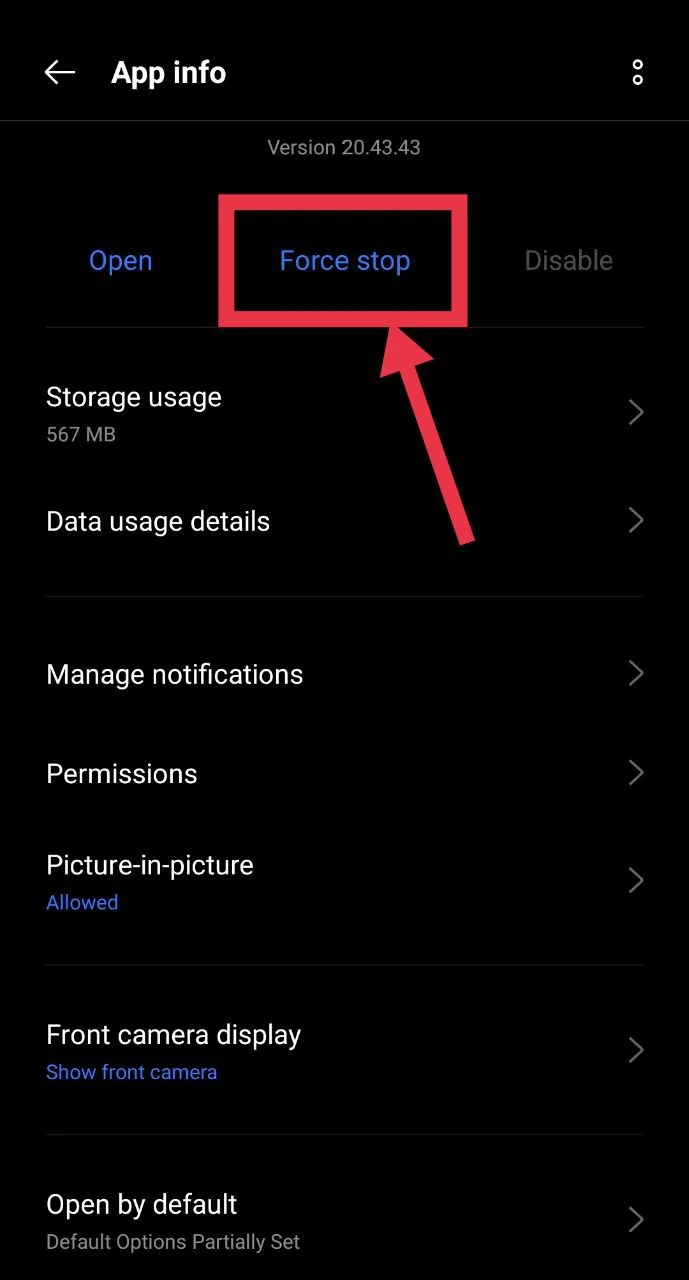
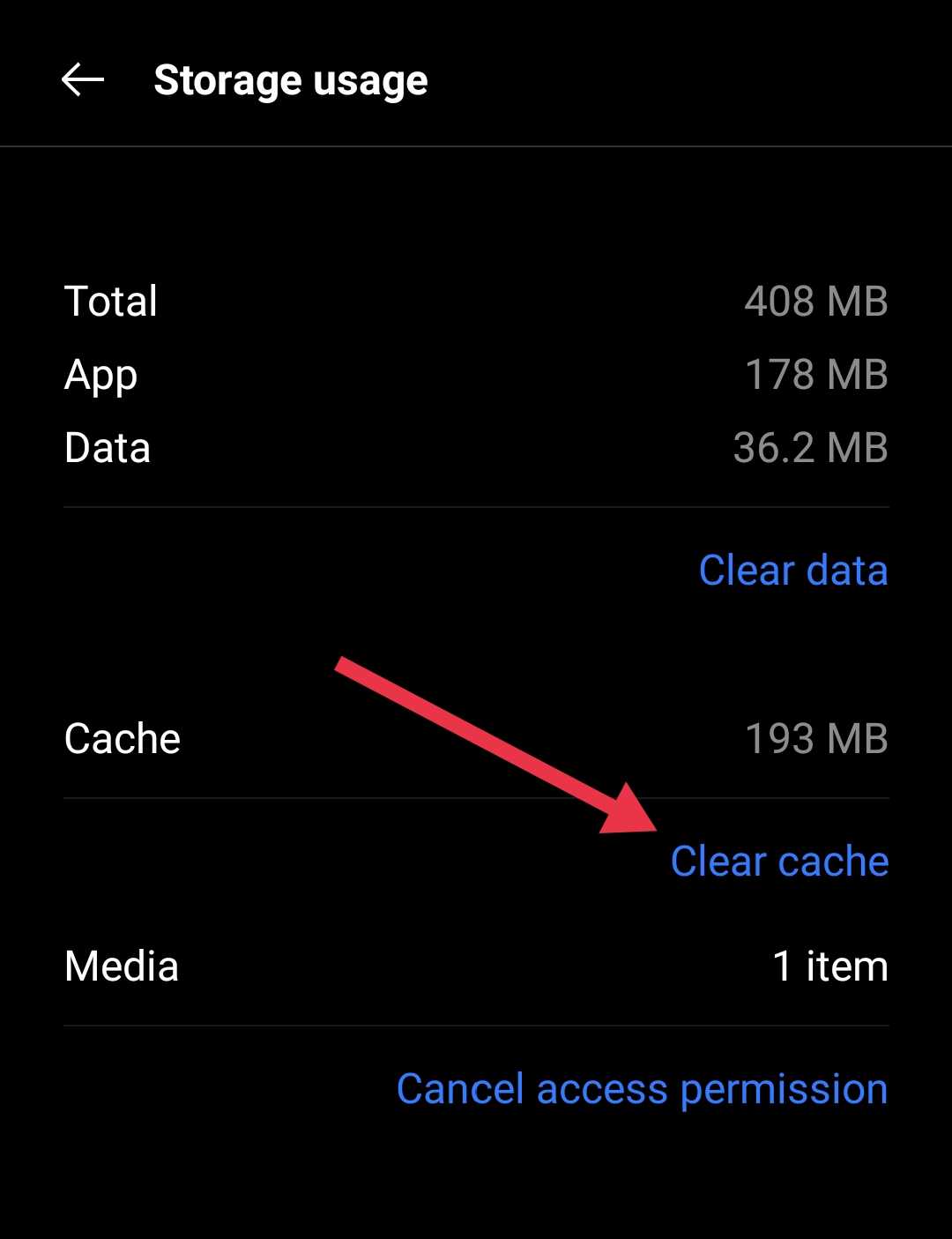
Some users were able to fix the issue by stopping the Facebook app completely and clearing its cache from the app settings. Using the regular close option from the home screen does not fully stop the app, so this method can work better if you are an Android user.
- Go to your phone settings, open the App info page for Facebook by heading over to Apps > Facebook
- Tap the “Force stop” option first

- Then click on the “Clear cache” option under the storage section

- Once you finish both steps, open the Facebook app and check Marketplace listings.
Log Out and Log In Back
If Marketplace is not showing all listings, your account session might have an issue. The simple step that can help resolve this issue is relogging.
- Open the Facebook app on your phone.
- Tap the Menu icon. (On iPhone, it is at the bottom right corner, and on Android, it appears at the top right corner.)
- Scroll down and choose the “Log out” option.

- After that, close the Facebook app from the app switcher
- Now, again, reopen the Facebook app on your phone and log in with your credentials.

Disable Third-Party Extensions
Some extra extensions added to your browser can interfere with Marketplace on the web. What you can try is turning off the unnecessary ones using the steps below.
- Open Google Chrome and tap the menu icon with three dots in the top right corner.
- Tap “Extensions” and then choose “Manage Extensions”

- Turn off or remove any extensions you do not need from the list.
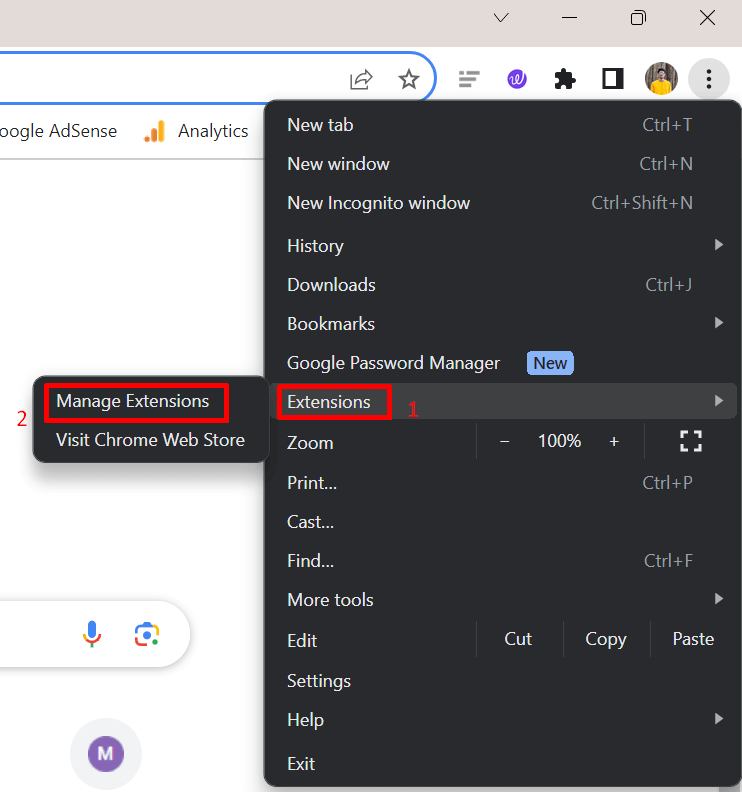
Note: We used Chrome here, and the steps or screenshots are based on Chrome. However, the process is nearly the same on most web browsers. The wording may differ a little, but if you are a long time user of any particular browser, you can easily find the extension section in the menu or settings.
Reinstall the App on Android and iPhone
If Facebook Marketplace listings still do not load, reinstalling the app can help fix the issue.
- On iPhone: Delete the Facebook app from your phone, not just from the Home Screen. Then open the App Store and install it again.
- On Android: Uninstall the Facebook app from your device. After that, open the Play Store and install it once more.
Try the Web Version or Use Desktop Mode
If the Marketplace listings do not load on the mobile app, you can try using the web version of Facebook through your browser. It may show the full list of items.
If you are already using the mobile site and still face the issue, you can switch to the desktop version of the page.
- Open your browser and visit the Facebook website
- Tap the menu and enable the desktop site option.

- Then open Facebook again and check Marketplace listings.

Change Your Facebook Marketplace Region
Your current location setting may limit the listings you see. Updating it can help you view more items around you.
- Open the Facebook app on your phone.
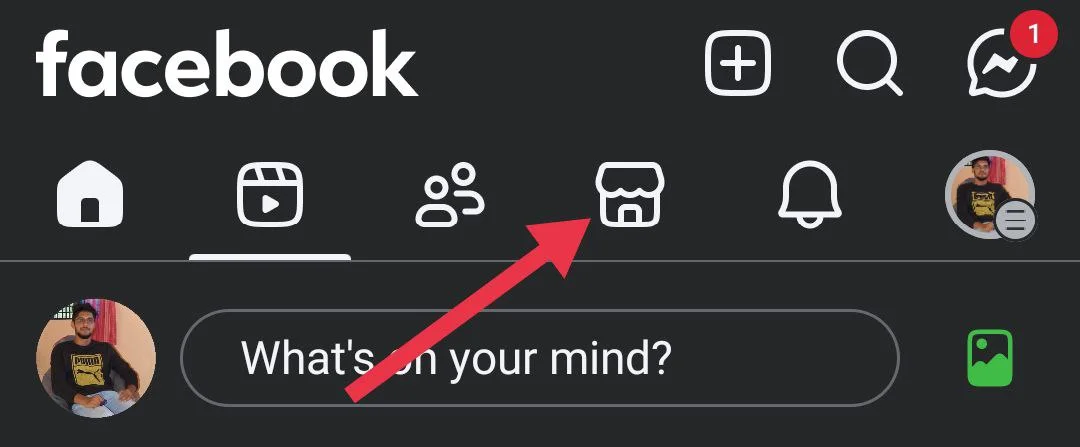
- Tap the Marketplace option (bottom bar on iPhone, top bar on Android).

- Tap the location field shown at the top of the screen.
- Now, search for a town, city, neighborhood, or postcode you want to browse.
Contact Facebook Support
If nothing else works, reaching out to Facebook Support is the last option. It is not always the easiest step, and many users, including me, are unhappy with how support works, as most reviews say the replies are slow and handled by automated systems.
Still, it is worth trying if your Marketplace access has completely disappeared or if the issue keeps coming back. You can report the problem through the “Help and Support” section in the app and wait for their response. You can even shake your phone to report an issue instantly, just like on Instagram. Even though the experience may vary, this is the only official way to request further help from Facebook.
RELATED GUIDES:
- How to Fix Facebook Marketplace Messages Not Showing on Messenger
- Facebook Marketplace Limit Reached? Easy Fixes That Actually Work