
Considering a lot of people love to see all profile interactions on Facebook, an app called xView may come in handy for a lot of people. We used the xView: Profile Tracker Reports app to test and find out whether this app would be useful or not.
Developed by RZG Labs, xView: Profile Tracker Reports app claims to track the activities of friends and even strangers. Let’s review the xView Facebook app and see if it is worthy of all the hype. Read on to know our xView Facebook app review.
xView Facebook App Review
Many people, who have gone through xView Facebook app review, have said that the app would be helpful to know what the number order means in stranger interactions.
There is no information on the significance of the number order and how that works. The number order seems absurd since it does not mean anything and shuffles around randomly.
The number order should show the order in which people viewed your profile, and it makes no sense for profiles you’ve viewed to be included in that order.
Most people probably install the app and subscribe only to see who looks at their profile (stranger interactions).
It turns out stranger interactions aren’t just with people who view our profiles, but also with those profiles you’ve visited. The experience would be much better if only I could see people who viewed my profile. It’s not necessary to list the profiles I visited since I know who I visited.
In addition, the “interactions” aren’t accurate. No additional information is provided other than the name and profile photo. There is no description, no dates, or anything else.
Another important thing that is missing from the app is that there is no instruction, and there is no walkthrough guide on how to use it. 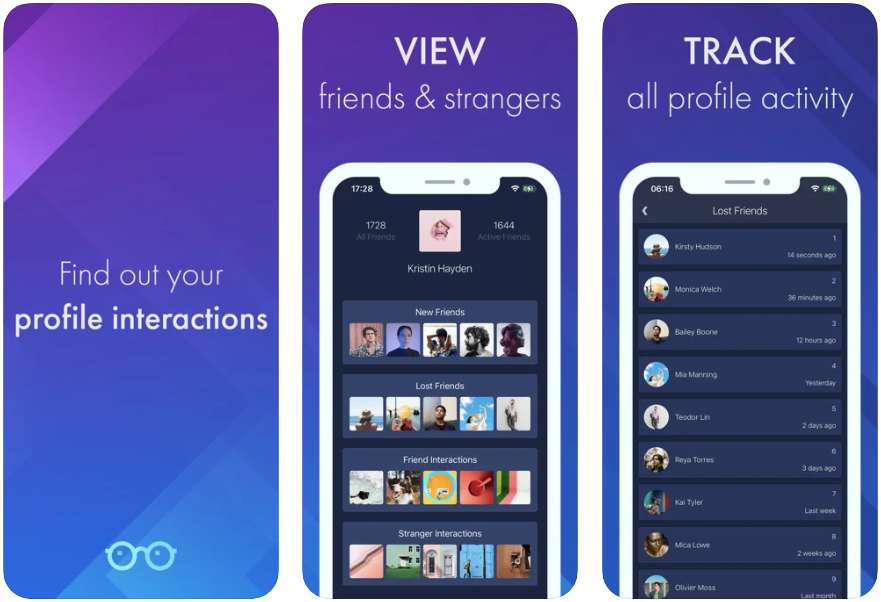
xView Facebook App Requirements
xView Facebook App requires iOS 11.0 or later on iPhone and iPad touch and macOS 11.0 or later and a Mac with an Apple M1 chip on Mac operating system. Unfortunately, the app is not available for Android users.
xView Facebook App Features
According to the description on the iOS app store, the app offers features to
- View the interactions between your friends and your profile
- Check out stranger interactions with people who aren’t your friends
- You can view new friends you have added and when they were added.
- You can see who you’ve lost (unfriended) and at what time.
- Find out when your friends reactivate their accounts.
xView Facebook App Pros
- Keep track of all profile activities
- Option to see the profile interactions
- Regular updates
- Every update fixes bugs
- Free to use basic features.
xView Facebook App Cons
- No instructions on how to use it.
- The user interface is complicated and confusing
- Available only for the iOS platform.
ALSO READ: –
xView Facebook App Plans & Pricing
Xview Facebook is a free application for iOS. For more advanced features, there is an in-app purchase you can make.
- xView Pro – $3.99
- xView Pro – $8.99
- xView Pro – $29.99
xView Facebook App Interface & Performance
Available only for iOS devices, xView app is simple to install but definitely confusing to use. This app dumps you into it and you have to figure out what it does.
That would have been a great addition if they added instructions on how to use the app. Most of the xView Facebook app reviews mention the confusing interface of this app.
What Does xView App Do?
xView Facebook App lets you see your new friends in real-time, for free. You can see who unfriended you and the time when they unfriended you. The xView app also shows your friends when their accounts are reactivated.
xView Facebook App Alternatives
- WhosHere.
- Macro Polo
- Sync.Me
- SocialView
- Profile View + Who Unfollow Me
xView Facebook App Legit or Scam?
Well. The app has been around for the last few years and the app is genuine. But the features they are offering and the data they are showing are not accurate. All in all, the xView app is not a useful app to see who viewed your Facebook profile.
Conclusion
While you can’t see who’s looking at your profile on Facebook, there’s still a large desire, especially with Facebook’s growing user base, to know stranger interactions on Facebook. There are lots of fake apps that claim to see who looks at Facebook profile.
Despite not being able to display a list of people who were viewing your account, it will display the most active profile on your account. Therefore, this doesn’t tell you anything that you didn’t know.
While it is possible to see some of the activity on your profile, it is not possible to see the details of the viewers.
I hope our article on xView Facebook App review helped you. If you’ve used this app, don’t forget to share your review in the comments section below.